See Video AI

See Video AI - SeeVido AI: Free AI Video Platform & Generator, Text to Video AI for Stunning Automated Video Production with Seedance 2.0 AI

See Video AI

See Video AI -Introduction

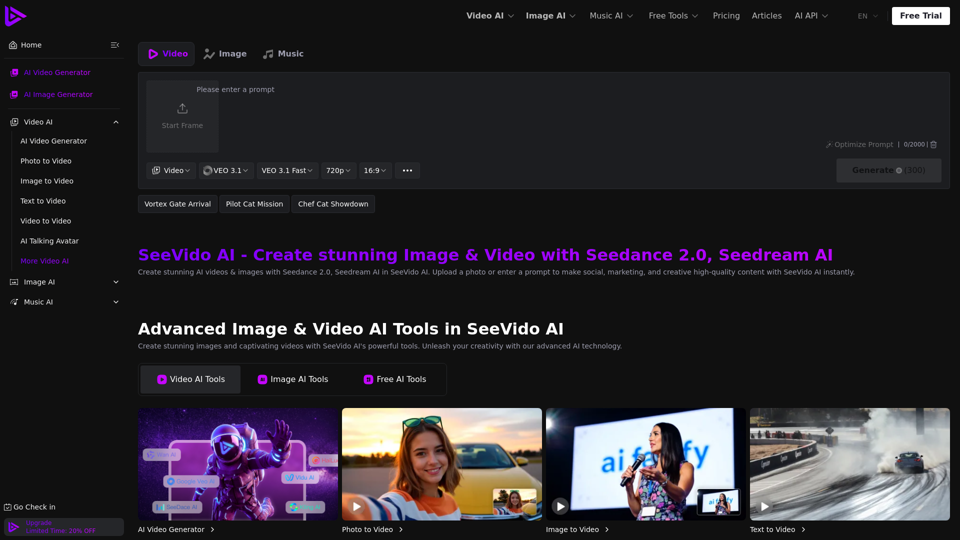
See Video AI is an innovative platform that empowers users to effortlessly create stunning videos and images using advanced artificial intelligence. As a comprehensive AI Video Generator and AI Video Platform, it transforms text prompts or uploaded photos into high-quality visual content. Designed for automated video production, See Video AI streamlines the creation process, enabling individuals and businesses to generate captivating visuals for social media, marketing campaigns, and various creative projects with remarkable ease and speed. Unleash your creativity and produce professional-grade content instantly with See Video AI.

See Video AI -Features

Product Features of See Video AI

  • Overview: SeeVido AI is an advanced AI-powered platform designed for generating stunning, high-quality videos and images from text, photos, and other media. Leveraging cutting-edge AI models like Seedance 2.0 and Seedream AI, it offers a comprehensive suite of tools for automated content production.
  • Main Purpose: To democratize video and image creation through artificial intelligence, allowing users to effortlessly produce engaging content for social media, marketing, personal projects, and creative expression. It aims to simplify complex video and image editing processes into intuitive AI-driven workflows.
  • Target User Group:
    • Content Creators: YouTubers, TikTokers, social media influencers looking to generate viral content, memes, and unique visual effects.
    • Marketers & Businesses: Seeking to create compelling marketing videos, product showcases, and promotional images quickly and efficiently.
    • Artists & Designers: Exploring new creative possibilities with AI-generated visuals and animations.
    • Individuals: Anyone interested in transforming personal photos into dynamic videos, creating AI avatars, or experimenting with advanced image and video effects without needing specialized skills.
  • Function Details and Operations:
    • AI Video Generator:
      • Text to Video AI: Converts descriptive text prompts into dynamic video clips.
      • Image to Video / Photo to Video: Transforms static images and photos into animated videos, including advanced facial feature detection and mapping (e.g., Seedance 2.0 AI).
      • Video to Video: Modifies existing videos with AI effects and styles.
      • AI Talking Avatar Generator: Creates animated talking avatars from images.
      • Specialized Video Effects:
        • AI Dance Generator
        • AI Superman/Hulk Transformation
        • AI Face Dance
        • AI Hair Growth
        • AI Muscle Growth
        • AI Squish Effect
        • AI Venom Effect
        • Old Photo Animation
        • AI Handshake Video
        • AI Flying Video Generator
        • Balloon Flyaway Video Generator
      • Advanced AI Models: Utilizes models such as VEO 3.1, Happy Horse 1.0, Kling 3.0, Wan 2.6, Vidu Q3, and Hailuo 2.3 for diverse video styles, realism, and motion physics.
      • Output Quality: Supports various resolutions including 720p, 1080p, and 2K (for Vidu Q3).
      • Audio Integration: Features native audio generation and unified multi-modal audio capabilities.
      • Flexible Generation: Offers multi-version outputs and end-frame customization.
    • AI Image Generator:
      • Text to Image: Generates images from text prompts using models like GPT Image 2.0, Nano Banana 2 AI, Seedream 4.5 AI, and Seedream 5.0 AI.
      • Specialized Image Tools:
        • AI Headshot Generator
        • AI Hair Cut Generator
        • Old Photo Restorer
        • Labubu Toy Generator
        • Pet to Human Generator
        • AI Baby Generator
        • AI Action Figure Generator
        • Ghibli AI Generator
        • AI Halloween Generator
    • AI Music Generator:
      • Text to Music: Creates musical compositions from text descriptions.
      • Image to Music: Generates music inspired by visual inputs.
    • Core Operations: Users can upload photos or enter text prompts, select desired AI models and effects, and generate content with options for resolution, aspect ratio, and audio.
  • User Benefits:
    • Unleashed Creativity: Provides endless creative possibilities, allowing users to change gender, age, create new scenarios, memes, and unique visual narratives.
    • High-Quality Output: Delivers stunning, realistic videos and images with natural expressions, seamless integration, cinematic styles, and accurate motion physics.
    • Exceptional Efficiency: Processes photos in seconds and videos in minutes, ensuring quick and efficient results for rapid content creation.
    • Ease of Use: Designed for users of all skill levels, enabling the creation of professional-grade content with simple prompts and clicks, often requiring "no skills needed."
    • Privacy Protection: Ensures user data security by deleting uploaded photos within 24 hours.
    • Cost-Effective Solutions: Offers a free tier with daily credits and free tool access, alongside flexible premium plans and one-time credit purchases for enhanced features and commercial rights.
    • Commercial Rights: Premium plans include commercial rights for generated content and no watermarks.
  • Compatibility and Integration:
    • Platform Accessibility: Accessible via web browser (seevido.com) and a dedicated mobile application ("Download App").
    • API Access: Features an "AI API," indicating potential for integration with other platforms and custom applications.
    • Input/Output Formats: Supports a variety of media formats for both input (photos, text, video) and high-quality output (videos, images).
  • Customer Feedback and Case Studies:
    • Social Proof: The platform showcases examples of AI-generated content and user engagement through Twitter posts from @aifacefy, demonstrating viral-ready effects like AI Squish, AI Hair Growth, AI Handshake, and AI Venom transformations.
    • Use Cases: Examples illustrate practical applications such as creating TikTok trends, memes, profile videos, hair transformations for stylists, digital greetings, and dynamic social media posts.
  • Access and Activation Method:
    • Free Tier:
      • New users receive 40 credits upon sign-up.
      • Additional 20 credits for daily check-ins.
      • 5 times daily free tool usage.
      • Access to limited AI models.
      • Shared generation queue.
      • 15-day history retention.
    • Premium Subscriptions (Monthly/Yearly Plans):
      • Plans: COMMON, POPULAR, PROFESSIONAL.
      • Features: Offer increasing numbers of monthly credits (5,000 to 21,000+), premium AI features, powerful video and image generation, unlimited free tool usage, fast generation queues, 365-day history, private generations, commercial rights, and no watermarks.
      • Discounted Yearly Options: Significant savings are available for annual subscriptions.
    • One-Time Credit Purchases:
      • Packages: BASIC, ULTRA, MORE, MAX ULTRA.
      • Credits: Provides additional credits (4,000 to 100,000) for a single payment, valid for one month.
      • Features: Includes premium features, commercial rights, and no watermarks.
    • Activation: Users can register on the website or app and choose between the free tier or subscribe to a premium plan/purchase credits to unlock full features and higher usage limits.

See Video AI -Frequently Asked Questions

What is See Video AI?

See Video AI is an advanced AI platform that allows users to create stunning videos and images from text, photos, or other videos. It leverages powerful AI models like Seedance 2.0 and Seedream AI to generate high-quality content instantly for social media, marketing, and various creative projects.

What are the main features of See Video AI?

See Video AI offers a comprehensive suite of tools including an AI Video Generator (Photo to Video, Image to Video, Text to Video, Video to Video, AI Talking Avatar), an AI Image Generator (with models like GPT Image 2.0, Nano Banana 2 AI, Seedream AI), and AI Music generation (Text to Music, Image to Music). Key features of Seedance 2.0 AI include seamless photo-to-video conversion, creative possibilities for transformations, AI remaker capabilities, privacy protection, fast processing, and high-quality output.

How fast can See Video AI transform an image into a creative video?

See Video AI is designed for efficiency, processing photos in seconds and videos in minutes, guaranteeing quick and effective results for your creative projects.

How do I use See Video AI for videos?

To create videos with See Video AI, you can upload a photo, an existing video, or enter a text prompt. The platform's AI models will then generate high-quality video content based on your input.

What can I do with See Video AI for images?

With See Video AI's image generation tools, you can create stunning images from prompts, enhance existing photos, and utilize advanced models like GPT Image 2.0, Nano Banana 2 AI, and Seedream AI for various creative applications.

How does See Video AI ensure the quality of the output?

See Video AI is committed to providing high-quality videos and images. Its advanced AI models are designed to maintain natural expressions and ensure seamless integration, resulting in professional-grade content.

What AI models does See Video AI use for video generation?

See Video AI utilizes a variety of powerful AI models for video generation, including VEO 3.1, Happy Horse 1.0, Kling 3.0, Wan 2.6, Wan 2.5, Kling 2.5 Turbo, Vidu Q3, Hailuo 2.3, Hailuo 2.0, and Seedance 2.0.

Is See Video AI safe to use?

Yes, See Video AI prioritizes user privacy and safety. Uploaded photos are deleted within 24 hours to protect your personal data.

What input and output formats does See Video AI support?

See Video AI supports various media formats for both input (photos, text, videos) and output, allowing for flexible creation across a wide range of creative projects.

What is the pricing policy for See Video AI?

See Video AI offers a free tier with limited features and daily credits. For more extensive use, premium plans are available on a monthly or yearly basis (Common, Popular, Professional), providing more credits, premium AI features, faster generation, longer history, commercial rights, and no watermarks. One-time credit packages are also available for additional credits.

Does See Video AI offer refunds?

For information regarding refunds, please refer to See Video AI's official Refund Policy.

Is See Video AI affiliated with any AI model provider?

See Video AI integrates various advanced AI models. For specific affiliations or partnerships, please refer to their official documentation or contact their support team.
See Video AI -Data Analysis

Latest Traffic Information

  • Monthly Visits

    -

  • Bounce Rate

    0.00%

  • Pages Per Visit

    0.00

  • Visit Duration

    00:00:00

  • Global Rank

    -

  • Country Rank

    -

Visits Over Time

Traffic Sources

  • direct:
    0.00%
  • referrals:
    0.00%
  • social:
    0.00%
  • mail:
    0.00%
  • search:
    0.00%
  • paidReferrals:
    0.00%
More data

See Video AI - Alternative

PixVerse AI

PixVerse AI - AI Video Creator & Generator App on App Store & Google Play

--
Image to Video AI

Image to Video AI - Flux AI Video Generator | Online Image to Video AI Generator

--
PDF To Brainrot

PDF To Brainrot - Convert PDFs into Engaging Brainrot Videos with Our PDF Transformation Tool

--
Flux AI Image Generator

Flux AI Image Generator - Free Online Advanced AI Image Generator

--
More Tags about: See Video AI