• Free Tools
  • OpenSubs

    OpenSubs - Free AI Subtitle Downloader for Movies and TV Shows

    OpenSubs

    OpenSubs -Introduction

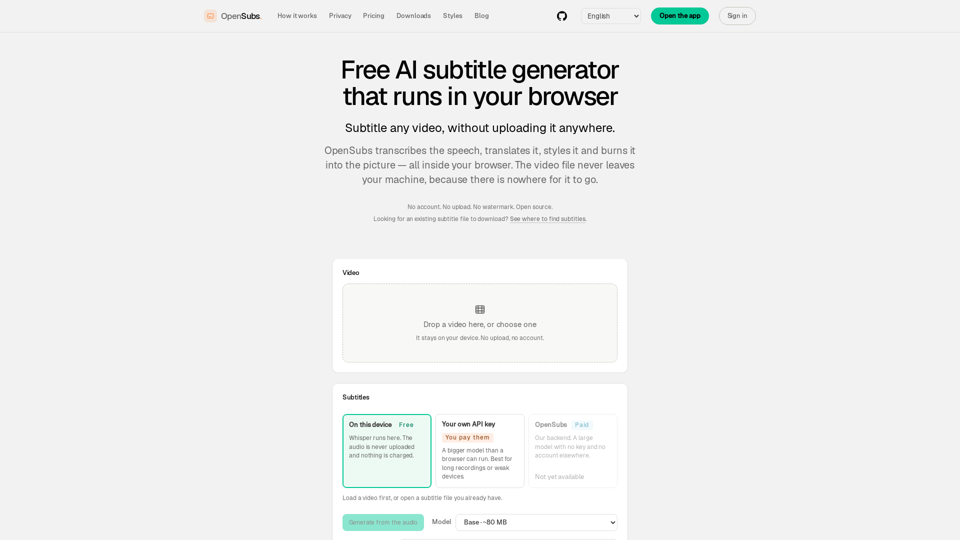
    OpenSubs is a powerful, privacy-focused AI subtitle generator that operates entirely within your web browser. By leveraging local processing, it allows users to transcribe, translate, and burn subtitles into videos without ever uploading files to a server. This ensures complete data security, as your video content never leaves your machine. Designed for efficiency and ease of use, OpenSubs supports multiple languages and offers professional styling presets, making it an ideal solution for creators who prioritize privacy and high-quality, watermark-free results. Whether you are working on short clips or long-form content, OpenSubs provides a seamless, account-free experience that keeps your media files local and secure.

    OpenSubs -Features

    Overview

    OpenSubs is a powerful, privacy-focused, and open-source AI subtitle generator that operates entirely within your browser. By leveraging WebAssembly and local machine processing, it allows users to transcribe, translate, style, and burn subtitles into videos without ever uploading files to a server.

    • Main Purpose and Target User Group

      • Content Creators: Need to add professional-looking captions to social media videos without privacy risks.
      • Privacy-Conscious Users: Prefer to keep sensitive or proprietary video footage on their own devices.
      • Developers: Require a consistent, open-source engine for scripting, CI/CD pipelines, or custom subtitle workflows.
    • Function Details and Operations

      • Local AI Transcription: Utilizes the Whisper model (running via WebGPU/WebAssembly) to transcribe audio directly on your machine.
      • Multi-Language Translation: Supports translation into 20+ languages, including Chinese, Japanese, Korean, Spanish, and more.
      • Advanced Styling: Offers 12 customizable presets, including dynamic word-by-word highlighting and broadcast-quality captions.
      • Video Burning: Exports finished MP4 files with hardcoded subtitles using WebCodecs, or generates standard subtitle files (.srt, .vtt, .ass).
      • Flexible Processing: Allows users to bring their own API keys (Claude, OpenAI, DeepL) for advanced translation or use the platform’s credit-based backend.
    • User Benefits

      • Total Privacy: Since no video is ever uploaded, there is zero risk of data leaks or unauthorized access to your footage.
      • Zero Watermarks: OpenSubs does not brand your videos.
      • Cost-Effective: All local processing is free forever.
      • No Account Required: Users can access the full suite of local tools without signing up or logging in.
    • Compatibility and Integration

      • Browser-Based: Works directly in modern web browsers (Chrome, Edge, Firefox) without needing software installation.
      • Cross-Platform Apps: Offers a dedicated desktop application for macOS, Windows, and Linux for handling long files or batch processing.
      • CLI Support: Provides a command-line interface for advanced users, scripting, and automated workflows.
      • Browser Extension: A companion extension is available to generate subtitles for videos playing in your browser tabs in real-time.
    • Access and Activation Method

      • Web Access: Visit the official website to start using the browser-based tool immediately.
      • Desktop/CLI: Download the latest release candidates from the official website or build from the source code available on GitHub.
      • API Integration: Users can optionally input their own API keys directly into the browser interface to enable advanced cloud translation features.
    OpenSubs -Frequently Asked Questions

    Frequently Asked Questions

    What is OpenSubs and how does it work?

    OpenSubs is a free, privacy-focused AI subtitle generator that runs entirely within your web browser. It uses local machine learning (Whisper) to transcribe, translate, and style your video content without ever uploading your files to a server. Because the processing happens on your own device, your video files remain private and secure.

    Is OpenSubs a subtitle downloader or a search engine?

    OpenSubs is primarily an AI-powered subtitle generation tool. While it is not a traditional subtitle search engine for downloading existing files for movies or TV shows, it allows you to generate high-quality subtitles for your own videos instantly.

    Is it free to use OpenSubs?

    Yes, all features that run locally on your machine—including transcription, on-device translation, styling, and burning subtitles into MP4 files—are completely free. We only charge for optional cloud-based translation services, and you will always see the price before you start a job.

    Do I need to create an account to use OpenSubs?

    No account is required to use the core features of OpenSubs. You can transcribe, translate, style, and export subtitles without signing in. An account is only necessary if you choose to purchase credits for our optional cloud translation backend.

    How does OpenSubs ensure my privacy?

    Privacy is built into the core of OpenSubs. Since the application runs in your browser, your video files are never uploaded to a server. The transcription and processing happen locally on your device. If you use your own API keys for translation, those keys are held only in your browser's memory and are never stored or sent to our servers.

    Can I burn subtitles directly into my video?

    Yes, OpenSubs allows you to burn subtitles directly into your MP4 video files using WebCodecs. You can also export your subtitles in standard formats like .srt, .vtt, or .ass for use in other video editing software.

    Does OpenSubs add watermarks to my videos?

    No, OpenSubs does not add any watermarks to your videos. Whether you export a subtitle file or burn the subtitles into your video, the output remains clean and professional.

    OpenSubs -Data Analysis

    Latest Traffic Information

    • Monthly Visits

      -

    • Bounce Rate

      0.00%

    • Pages Per Visit

      0.00

    • Visit Duration

      00:00:00

    • Global Rank

      -

    • Country Rank

      -

    Visits Over Time

    Traffic Sources

    • direct:
      0.00%
    • referrals:
      0.00%
    • social:
      0.00%
    • mail:
      0.00%
    • search:
      0.00%
    • paidReferrals:
      0.00%
    More data

    OpenSubs - Alternative

    Image to Prompt

    Image to Prompt - Free AI Image Generator & Prompt Engineering Tool

    169.1 K
    Hix Bypass AI

    Hix Bypass AI - Undetectable Bypass Tool for Content and AI Bypass Technology (Free)

    --
    PDF To Brainrot

    PDF To Brainrot - Convert PDFs into Engaging Brainrot Videos with Our PDF Transformation Tool

    --
    Lark

    Lark - Ultimate Collaboration Platform & Productivity Tool for Team Communication

    --
    More Tags about: OpenSubs