Omni Flash

Omni Flash - AI Productivity Tools & Automated Workflow Software for Intelligent Task Management

Omni Flash

Omni Flash -Introduction

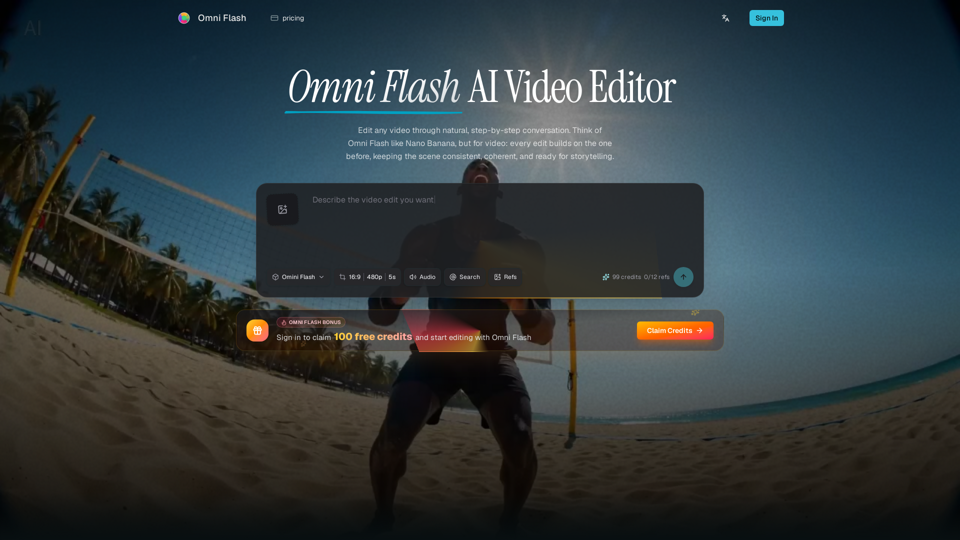
Omni Flash is a revolutionary AI-powered video editor that transforms the creative process through natural, step-by-step conversation. Unlike traditional tools that rely on complex timelines, this platform allows users to refine videos using plain language, ensuring that every edit builds logically upon the last. By integrating multimodality with deep world understanding, Omni Flash enables creators to seamlessly incorporate images, sketches, audio, and text references into their projects. Whether you are swapping characters, adjusting environments, or applying specific visual styles, the platform maintains scene consistency and narrative coherence throughout the entire editing journey. Designed for precision and control, Omni Flash grounds every adjustment in real-world physics and logic, making it an essential tool for creators who demand professional-grade results without the need for manual, frame-by-frame manipulation. Experience a more intuitive way to produce high-quality, intentional video content.

Omni Flash -Features

Omni Flash

Omni Flash is a cutting-edge AI video editor that transforms the creative process through natural, step-by-step conversation. Unlike traditional one-shot video generators, Omni Flash functions as an intelligent assistant that understands context, physics, and narrative logic, allowing users to build and refine videos iteratively while maintaining perfect scene consistency.

Main Purpose and Target User Group
The primary purpose of Omni Flash is to provide a conversational, reference-driven environment for high-fidelity video editing. It is designed for creative directors, video marketing leads, storyboard artists, motion designers, and independent filmmakers who require precise control over character swaps, style transfers, and physics-aware scene adjustments without the complexity of traditional manual timelines.

Function Details and Operations

  • Multi-turn Refinement: Edit your video incrementally. Each prompt builds on the previous one, ensuring that changes to mood, camera angles, or objects do not break the scene's continuity.
  • Conversational Editing: Replace complex manual layer work with plain language instructions.
  • Reference-Driven Creation: Guide your edits using diverse inputs, including images, text briefs, video clips, audio cues, sketches, and motion references.
  • World-Aware Logic: The AI incorporates real-world physics (gravity, fluid dynamics, momentum) and contextual knowledge (history, science, cultural logic) to ensure edits feel grounded and realistic.
  • Character and Object Swapping: Seamlessly replace subjects or props while preserving original motion, timing, and dialogue.

User Benefits

  • Consistency: Maintain visual and narrative coherence across long editing sessions.
  • Efficiency: Eliminate the need to restart from scratch; refine specific elements while keeping the rest of the scene intact.
  • Creative Control: Achieve professional-grade results by combining multiple inputs (sketches, styles, and motion cues) into a single, cohesive narrative.
  • Physics-Based Realism: Create believable movement and interactions that respect the laws of nature and narrative logic.

Compatibility and Integration
Omni Flash is a web-based platform designed to streamline AI productivity tools and automated workflow software. It supports a wide range of input formats, including video files, images, audio tracks, and text prompts, making it highly compatible with existing creative assets and professional design workflows.

Access and Activation Method
Users can access Omni Flash by visiting the official website at https://omniflashai.org/. New users can sign in to claim free credits to begin their first project. The platform offers a free-to-try model with daily credits, with paid plans available for users requiring higher volume and expanded creative capabilities for larger projects.
Omni Flash -Frequently Asked Questions

What is Omni Flash and how does it improve AI productivity?

Omni Flash is an advanced AI video editor that streamlines creative workflows through natural, step-by-step conversation. By replacing complex timelines with intelligent, conversational editing, it serves as one of the most effective AI productivity tools for creators. It allows you to refine actions, styles, and environments iteratively, ensuring your automated workflow software needs are met with precision and speed.

How does Omni Flash handle intelligent task management for video projects?

Omni Flash simplifies video production by allowing you to build scenes through multi-turn refinement. Instead of restarting from scratch, you can use plain language to adjust camera angles, swap characters, or change lighting. This intelligent task management approach ensures that every edit builds on the previous one, maintaining scene consistency and coherence throughout your project.

Can I use reference materials to guide my edits in Omniflashai?

Yes. Omniflashai is designed to be highly versatile. You can upload images, sketches, audio cues, video clips, or text briefs to guide your edits. The AI integrates these references into a single, cohesive narrative, allowing for professional-grade control over your final output.

Is Omni Flash suitable for professional character and object replacement?

Absolutely. Omni Flash excels at replacing characters and objects while preserving the original motion, timing, and dialogue of your source video. By using reference images, you can guide the new look of your subjects while the AI ensures the scene remains visually consistent and logically sound.

Does Omni Flash support physics-aware editing?

Yes. One of the core differentiators of Omni Flash is its ability to ground edits in real-world logic. It understands gravity, fluid dynamics, momentum, and historical or scientific context, ensuring that your video edits feel realistic and physically accurate.

Omni Flash -Data Analysis

Latest Traffic Information

  • Monthly Visits

    -

  • Bounce Rate

    0.00%

  • Pages Per Visit

    0.00

  • Visit Duration

    00:00:00

  • Global Rank

    -

  • Country Rank

    -

Visits Over Time

Traffic Sources

  • direct:
    0.00%
  • referrals:
    0.00%
  • social:
    0.00%
  • mail:
    0.00%
  • search:
    0.00%
  • paidReferrals:
    0.00%
More data

Omni Flash - Alternative

A2E Free and Uncensored AI Videos

A2E Free and Uncensored AI Videos - Generate Uncensored AI Content with Our Free AI Video Creator Platform

--
Veo 4

Veo 4 - Free AI Video Generator: 4K Cinematic Clips

--
MojoMake AI Video & Image Studio

MojoMake AI Video & Image Studio - Generative AI Platform for Video & Image Creation

--
Vidoly AI Image & Video Generator

Vidoly AI Image & Video Generator - AI Video, Text to Image, Generative AI Content Creation Tool

--
More Tags about: Omni Flash