Image to Video AI

Image to Video AI - Best AI Video Generator to Convert Image to Video Online

Image to Video AI

Image to Video AI -Introduction

Image to Video AI is a premier online platform designed to transform static photos into stunning, cinema-quality videos with ease. By leveraging advanced artificial intelligence, this tool allows users to upload images in various formats—such as JPG, PNG, or WEBP—and apply descriptive text prompts to generate realistic, high-definition motion. Whether you are a marketer crafting engaging social media ads, a content creator producing cinematic reels, or a professional looking to animate product stills, this platform provides a seamless, intuitive experience. Designed for efficiency and accessibility, the service offers a free tier that enables users to generate daily videos without the need for complex software or expensive subscriptions. With its lightning-fast processing and high-quality output, Image to Video AI empowers creators of all skill levels to bring their visuals to life. From subtle atmospheric effects to dynamic camera movements, the engine interprets your creative vision to deliver professional results in seconds. Discover why thousands of users rely on this powerful AI solution to enhance their digital content and captivate audiences across all platforms.

Image to Video AI -Features

Overview

Image to Video AI is a cutting-edge, web-based AI video generator designed to transform static images into dynamic, cinematic-quality videos. By leveraging advanced AI models, the platform allows users to convert photos into motion-rich content in seconds, offering a seamless bridge between still photography and professional video production.

Main Purpose and Target User Group

Main Purpose

  • To provide an accessible, high-speed solution for animating static visuals (JPG, PNG, WEBP) using text-guided motion prompts.

Target User Group

  • Content Creators: For social media reels and viral video clips.
  • Marketers: For creating engaging product ads and promotional content.
  • Real Estate Professionals: For turning property photos into cinematic walkthroughs.
  • Designers: For bringing mockups and concept boards to life.
  • General Users: Beginners looking for an easy, no-code way to animate personal photos.

Function Details and Operations

  • AI-Powered Motion Generation: Uses sophisticated algorithms to interpret visual content and apply realistic physics, such as flowing water, drifting clouds, or camera pans.
  • Prompt-Guided Animation: Users can input descriptive text prompts (e.g., "slow camera zoom," "wind blowing") to gain precise control over the animation style.
  • Flexible Input/Output: Supports high-quality image uploads up to 20MB and delivers crisp, high-definition video output.
  • Optimized Processing: A high-speed pipeline ensures that videos are generated in seconds, supporting batch creation for high-volume content needs.
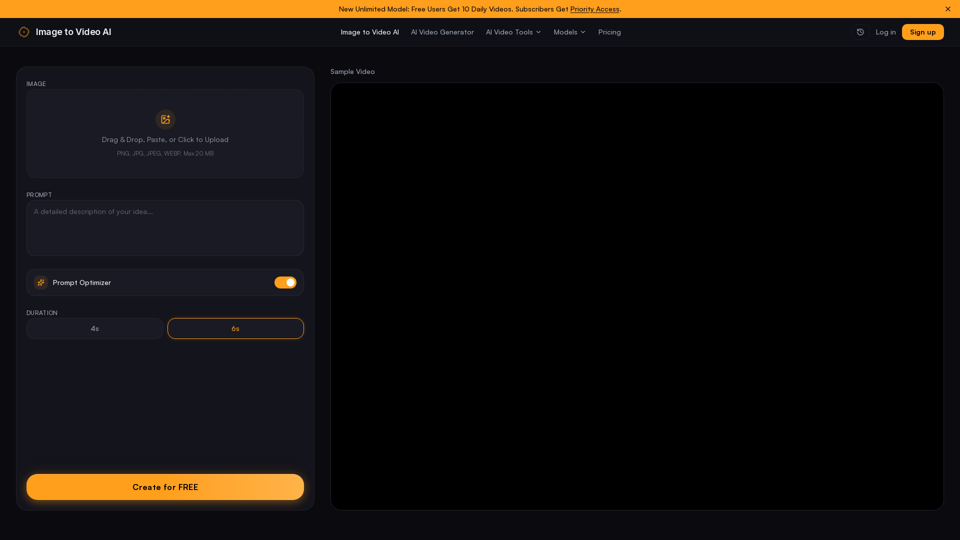
  • User-Friendly Interface: A simple three-step workflow: Upload image, add motion prompt, and generate/download.

User Benefits

  • Professional Quality: Produces cinema-grade motion that rivals expensive, complex software.
  • Efficiency: Drastically reduces production time, allowing for rapid content creation.
  • Cost-Effective: Offers a generous free tier with daily video credits.
  • No Watermarks: Provides clean, professional output suitable for commercial use.
  • Accessibility: No advanced editing skills required; the intuitive drag-and-drop interface is designed for all experience levels.

Compatibility and Integration

  • File Support: Compatible with standard image formats including JPG, PNG, and WEBP.
  • Platform Ready: Optimized for direct export to major social media platforms like YouTube, TikTok, and Instagram.
  • Web-Based: Fully browser-based, requiring no software installation or high-end hardware to run.

Access and Activation Method

  • Access: Users can access the tool directly at imgtovideoai.net.
  • Activation: The platform offers a "No Sign Up" experience for quick access. Users can start generating immediately by uploading an image.
  • Subscription Tiers: While free users receive daily video credits, subscribers gain priority access, higher resolution outputs, and additional premium features.
Image to Video AI -Frequently Asked Questions

Is there an Image to Video AI free option?

Absolutely! Our free Image to Video AI plan provides daily video generations at no cost, with no credit card required. Simply upload your image, add a prompt, and our AI video generator will create your video instantly.

What is the best Image to Video AI tool?

Imgtovideoai is widely considered the best AI animation tool for creators who need professional-grade results quickly. It combines ease of use with high-quality motion synthesis, allowing you to convert image to video with precise control over the output, making it a top choice for marketers, influencers, and designers.

Do you integrate the Veo 3 model or other AI engines?

Yes, we continuously update our platform to include cutting-edge AI video generator models. We integrate advanced engines—including options like Veo 3, Veo 2, and other industry-leading AI technologies—to ensure our users have access to the most realistic and high-quality motion effects available.

How can I create a video with images?

Creating a video is simple in three steps:

1. Upload

Upload your image (PNG, JPG, JPEG, or WEBP) to our platform.

2. Prompt

Enter a descriptive text prompt to guide the AI on the type of motion you want (e.g., "slow zoom" or "flowing water").

3. Generate

Click "Generate" to let our AI animation tool transform your static photo into a dynamic video in seconds.

Is there an AI image to video "no account" option?

Yes, our platform is designed for convenience. You can start using our Image to Video AI generator immediately without the need for a lengthy sign-up process, allowing you to experience the power of AI video generation right away.

How can I create professional results with free Image to Video AI?

To get the best results, use descriptive and specific prompts. Instead of just saying "move," describe the specific motion, such as "gentle camera pan" or "wind blowing through hair." Additionally, ensure your source image is high-resolution to help the AI engine produce the sharpest possible video output.

Image to Video AI -Data Analysis

Latest Traffic Information

  • Monthly Visits

    -

  • Bounce Rate

    0.00%

  • Pages Per Visit

    0.00

  • Visit Duration

    00:00:00

  • Global Rank

    -

  • Country Rank

    -

Visits Over Time

Traffic Sources

  • direct:
    0.00%
  • referrals:
    0.00%
  • social:
    0.00%
  • mail:
    0.00%
  • search:
    0.00%
  • paidReferrals:
    0.00%
More data

Image to Video AI - Alternative

Pollo AI

Pollo AI - AI Video Generation & Text to Video Generator | Free Sign Up & AI Tools

--
Youtube Video Summarizer AI

Youtube Video Summarizer AI - Free Online AI Summarizer & YouTube Transcript Generator by NoteGPT

--
ChatGPT Sora

ChatGPT Sora - Sora Library Access, Login & Video Creation App

--
MaxAI.me

MaxAI.me - Chat with Any Webpage, Read Faster, Write Better

--
More Tags about: Image to Video AI