• Free Tools
  • Video Compressor — VidPackit

    Video Compressor — VidPackit - Online Video Size Reducer & File Optimizer

    Video Compressor — VidPackit

    Video Compressor — VidPackit -Introduction

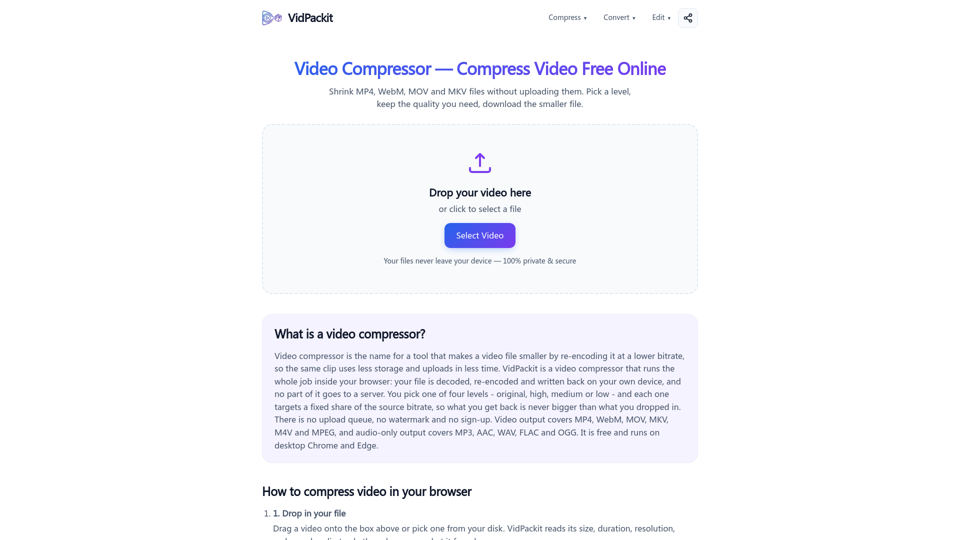
    Video Compressor — VidPackit is a secure, browser-based tool designed to shrink video files without the need for server uploads. By leveraging local processing, it ensures your files remain private and protected on your device throughout the entire compression process. Whether you need to reduce the size of MP4, WebM, MOV, or MKV files, this platform provides a seamless experience with no sign-ups, watermarks, or hidden queues. Users can easily manage file quality and resolution, making it an ideal solution for optimizing storage and improving upload speeds. With its intuitive interface and commitment to data privacy, Video Compressor — VidPackit offers a fast, efficient, and completely free way to handle your video optimization needs directly within your desktop browser.

    Video Compressor — VidPackit -Features

    Overview

    Video Compressor — VidPackit is a powerful, privacy-focused online video tool designed to shrink video file sizes directly within your web browser. Unlike traditional cloud-based converters, VidPackit performs all encoding and decoding locally on your device, ensuring that your sensitive media files are never uploaded to a server. It serves as a comprehensive video file optimizer that combines compression, format conversion, and basic editing in one seamless interface.

    Main Purpose and Target User Group

    The primary purpose of VidPackit is to provide a fast, secure, and free way to reduce video storage requirements and decrease upload times. It is the ideal solution for:

    • Content Creators: Who need to optimize clips for social media or web uploads.
    • Privacy-Conscious Users: Who prefer to keep personal or professional footage off third-party servers.
    • General Users: Looking for a quick, no-sign-up tool to convert formats or shrink large video files without technical complexity.

    Function Details and Operations

    • Local Processing: Uses browser-based WebCodecs to process files entirely on your machine.
    • Customizable Compression: Offers four distinct levels (Original, High, Medium, Low) with transparent bitrate targets, ensuring you know exactly how much data is being reduced.
    • Format Versatility: Supports a wide range of video outputs (MP4, WebM, MOV, MKV, M4V, MPEG) and audio-only extractions (MP3, AAC, WAV, FLAC, OGG).
    • Resolution Downscaling: Easily adjust video resolution to 720p, 480p, or 360p to further reduce file size.
    • Integrated Editing Tools: Includes features to trim videos, remove watermarks, remove captions, extract frames, and remove backgrounds.

    User Benefits

    • 100% Privacy: Since no data is uploaded, your files remain strictly on your device.
    • No Watermarks or Sign-ups: Enjoy a clean, professional output without branding or the need to create an account.
    • Zero-Guesswork Compression: The tool displays target bitrates before you start, preventing accidental file inflation.
    • Offline Capability: Once the page is loaded, the tool can function without an active internet connection.
    • Cost-Effective: Completely free to use with no daily limits or hidden fees.

    Compatibility and Integration

    • Browser Support: Optimized for desktop versions of Chrome and Edge, which provide the necessary WebCodecs support for high-performance in-browser encoding.
    • Input Compatibility: Capable of reading any file format your browser can decode, including MP4, MOV, MKV, WebM, AVI, and MPEG-TS.
    • Cross-Platform: Works on any desktop environment that supports modern browser standards, requiring no software installation or plugins.

    Access and Activation Method

    VidPackit is accessible directly through your web browser. Simply visit https://vidpackit.com/ to start using the tool immediately. There is no activation key or software download required; the tool is ready to use the moment the page loads. For the best experience, ensure you are using the latest version of Google Chrome or Microsoft Edge.
    Video Compressor — VidPackit -Frequently Asked Questions

    How does Video Compressor — VidPackit work?

    VidPackit is a powerful video size reducer that operates entirely within your web browser. Unlike traditional online tools, it does not upload your files to a server. Instead, it uses your browser’s local WebCodecs stack to decode, re-encode, and optimize your video directly on your device, ensuring 100% privacy and security.

    Can I compress video without quality loss?

    While lowering the bitrate inherently removes some data to reduce file size, VidPackit offers an "Original" level that maintains the source bitrate. For other levels (High, Medium, and Low), the tool provides transparent bitrate targets before you start, allowing you to balance file size and visual quality according to your specific needs.

    Is VidPackit a safe online video compressor?

    Yes. Because VidPackit is a client-side tool, your files never leave your computer. You can verify this by opening your browser's "Network" tab while compressing; you will see that no data is being transmitted to a server. You can even use the tool while offline once the page has loaded.

    Does VidPackit add watermarks to my files?

    No. VidPackit is a completely free video file optimizer that does not add watermarks, logos, or branding to your output. There are no sign-ups, no queues, and no daily usage limits.

    What file formats are supported?

    VidPackit supports a wide range of formats for both input and output. You can use it as an MP4 compressor, or to process WebM, MOV, MKV, M4V, and MPEG files. It also supports audio-only extraction in formats like MP3, AAC, WAV, FLAC, and OGG.

    Video Compressor — VidPackit -Data Analysis

    Latest Traffic Information

    • Monthly Visits

      -

    • Bounce Rate

      0.00%

    • Pages Per Visit

      0.00

    • Visit Duration

      00:00:00

    • Global Rank

      -

    • Country Rank

      -

    Visits Over Time

    Traffic Sources

    • direct:
      0.00%
    • referrals:
      0.00%
    • social:
      0.00%
    • mail:
      0.00%
    • search:
      0.00%
    • paidReferrals:
      0.00%
    More data

    Video Compressor — VidPackit - Alternative

    FramePack

    FramePack - Advanced AI Video Generation Framework

    --
    Veo 3 Video Generator

    Veo 3 Video Generator - Google DeepMind's AI Text-to-Video

    --
    Flux Text to Video

    Flux Text to Video - Free AI Video Generation & Creator

    --
    Hailuo 02

    Hailuo 02 - Minimaxi AI Model: Large Language Model for Chinese AI

    --
    More Tags about: Video Compressor — VidPackit