Seedance 2.0 Video AI
Overview
Seedance 2.0 Video AI is a multi-modal video generation model developed by Bytedance, designed for creative production. It allows users to integrate images, videos, audio, and text to create captivating video clips with high consistency and controllable expression. The platform emphasizes a "reference-driven" approach, making it ideal for projects requiring specific source material or stylistic goals.
Main Purpose and Target User Group
- Main Purpose: Enable users to generate, extend, and modify video content by combining various input modalities (images, videos, audio, text) with natural language control, ensuring high consistency and creative freedom.
- Target User Group: Creative professionals, marketers, educators, content creators, and anyone needing to produce high-quality, consistent video content efficiently—especially for series, brand campaigns, or explanatory videos.
Function Details and Operations
- Multimodal Content Input
- Simultaneously accepts multiple images, video clips, audio materials, and text prompts.
- All modalities inform each other to synchronize visuals, actions, and audio within the same semantic context.
- Reference-Driven Generation
- Leverages actions, characters, camera movements, scenes, or audio features directly from uploaded materials.
- Users specify which references to use via natural language, and the AI applies them instantly.
- Visual & Character Consistency
- Maintains stable character faces, costumes, styles, and scene continuity across video frames.
- Prevents style drift, crucial for series content or unified visual output.
- Video Extension & Local Editing
- Allows users to extend, join, or modify specific segments of existing videos.
- Enables editing of selected parts while keeping other regions unchanged, facilitating efficient iteration.
- Natural Audio-Visual Synergy
- Audio co-participates in the generation process, ensuring visuals and sound dynamics are harmonized for a polished result.
- User Interface
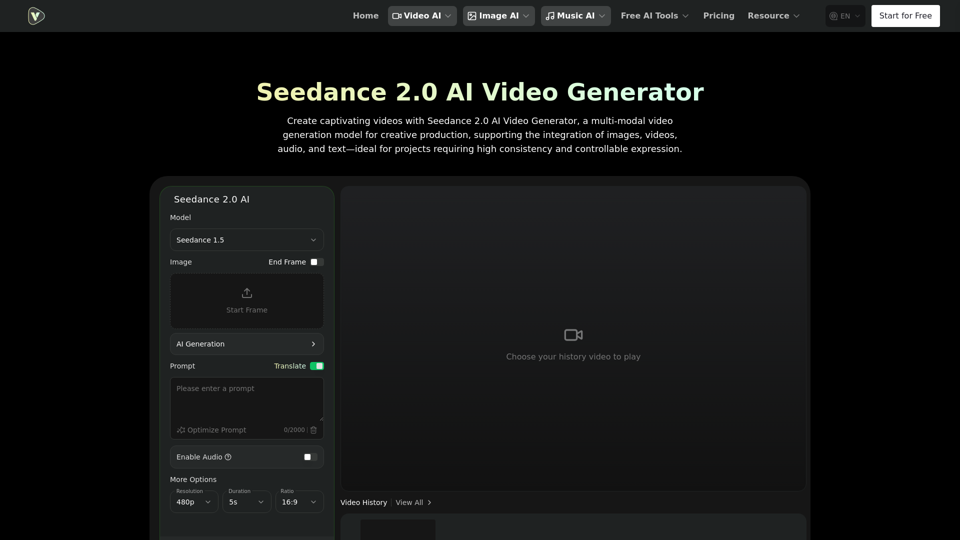
- Model Selection: Seedance 1.5, Seedance 2.0 (Coming Soon).
- Input Fields: Image, End Frame, Start Frame, AI Generation Prompt (up to 2000 characters).
- Options: Enable Audio, More Options.
- Resolution Settings: 480p, 720p.
- Duration Settings: 5s, 10s, 12s.
- Ratio Settings: 16:9, 21:9, 9:16, 1:1, 4:3, 3:4.
- Visibility: Public/Private.
- Generate Button: Initiates video creation.
- Video History: Displays previously generated videos.
User Benefits
- High Creative Freedom: Combines various asset types for an expressive workflow, mirroring real-world production.
- Intuitive Reference Understanding: Reduces trial-and-error costs by allowing complex output control through source assets and directives.
- Optimized for Series Content: Guarantees stable style and recurring characters across multiple videos, simplifying serialization.
- Efficient Iteration: Enables quick modifications and extensions of existing videos without re-generating the entire piece.
- Professional Quality: Ensures visuals and sound dynamics are harmonized for a complete, polished result.
- Versatile Applications: Suitable for brand marketing, educational content, creative storytelling, and dance/action expression.
Compatibility and Integration
- Input Modalities: Integrates images, videos, audio, and text.
- Platform: Accessible via Videoweb.ai, an AI video generation platform.
- Output: Generates video clips with synchronized visuals and audio.
Customer Feedback and Case Studies
- Application Scenarios
- Brand & Marketing Content: Producing new video versions using existing ad or template assets.
- Education & Explainers: Combining images, text, and audio for vivid explanatory content.
- Creative Storytelling & Shorts: Leveraging reference scenes and assets for coherent narratives.
- Dance & Action Expression: Applying actions from reference materials to new characters or scenes.
Access and Activation Method
- Access: Users can access Seedance 2.0 via the Videoweb.ai platform.
- Activation
- Upload images, videos, or audio materials as references.
- Describe the desired effect in natural language, specifying which reference materials to use.
- Generate the video result, then extend or adjust sections as needed.