Overview
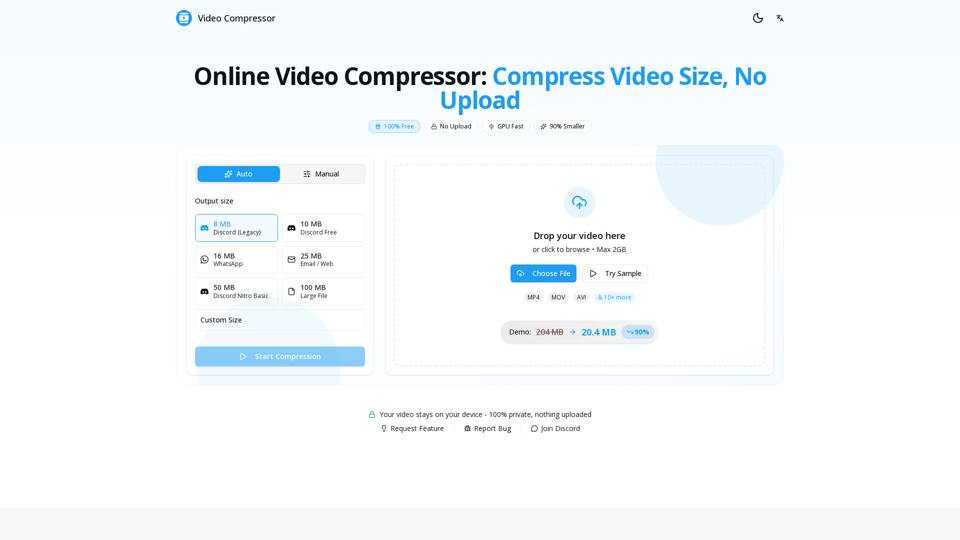
The Video Compressor is a high-performance, browser-based video compression tool designed to reduce video file size without compromising visual quality. It operates entirely locally on the user's device, ensuring maximum privacy and security by eliminating the need for file uploads to external servers.
Main Purpose and Target User Group
The primary purpose of this tool is to provide a fast, free, and secure way to compress video files for various platforms. It is specifically designed for:
- Content Creators: Needing to shrink large files for social media or client delivery.
- Gamers and Streamers: Requiring specific file sizes for Discord, Twitter, and other platforms.
- General Users: Looking to reduce video file size for email attachments, WhatsApp, or storage optimization on mobile devices.
Function Details and Operations
- Local Processing: Utilizes WebCodecs API to process files directly in the browser, ensuring zero data sharing.
- GPU Acceleration: Leverages the user's device hardware to achieve compression speeds up to 10x faster than standard CPU methods.
- Flexible Presets: Offers one-click optimization for Discord (8MB, 10MB, 25MB, 50MB, 100MB), WhatsApp, and Email.
- Manual Controls: Provides advanced users the ability to fine-tune resolution, bitrate, and frame rate for custom output requirements.
- Broad Format Support: Compatible with MP4, WebM, MOV, MKV, AVI, WMV, FLV, and more, outputting optimized H.264 MP4 files.
User Benefits
- 100% Privacy: Since no files are uploaded, your data remains strictly on your device.
- Cost-Effective: A completely free service with no hidden fees, subscriptions, or watermarks.
- Efficiency: Dramatically reduces file sizes (up to 90% reduction) while maintaining high visual clarity.
- Convenience: No software installation, registration, or account creation required.
Compatibility and Integration
- Browser-Based: Works seamlessly on all modern web browsers, including Chrome, Safari, Firefox, and Edge.
- Cross-Platform: Fully functional on both desktop computers and mobile devices (iOS/Android).
- Platform Optimized: Specifically engineered to meet the strict file size limits of Discord, Telegram, Twitter, and messaging apps.
Access and Activation Method
The tool is accessible instantly via the official website (https://videocompressors.com/). Users simply drag and drop their video files into the browser interface, select their desired preset or custom settings, and click "Start Compression" to download the optimized file immediately. No activation or sign-up is required.