Printery - Print for Figma

Printery - Print for Figma - Professional Print-Ready PDF Export Plugin with CMYK, Bleed & ICC

Printery - Print for Figma

Printery - Print for Figma -Introduction

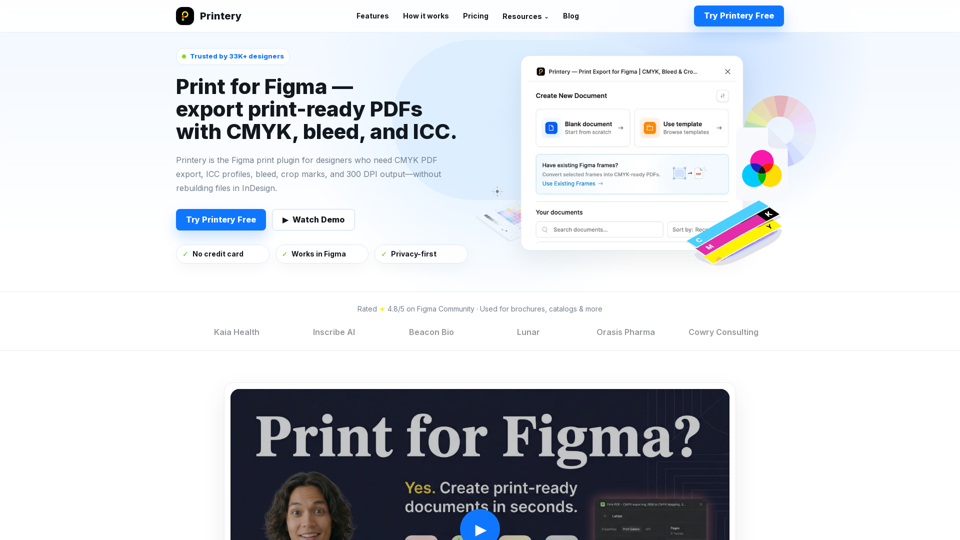
Printery - Print for Figma is the essential plugin for designers who need to bridge the gap between digital interface design and professional print production. By enabling direct, print-ready PDF exports from Figma, it eliminates the need to rebuild files in external software like InDesign. Trusted by over 33,000 designers, the platform provides the critical tools required for high-quality output, including CMYK color conversion, ICC profile embedding, and precise control over bleed and crop marks. Whether you are creating brochures, catalogs, packaging, or marketing materials, Printery ensures your designs meet industry standards for commercial printing. With its intuitive workflow, you can manage DPI settings, handle multi-page documents, and utilize Pantone spot colors directly within your Figma environment. Printery empowers creative teams and agencies to deliver professional, press-ready files with confidence, streamlining the transition from screen to paper while maintaining color accuracy and production integrity.

Printery - Print for Figma -Features

Overview

Printery is a specialized Figma printing plugin designed to bridge the gap between digital design and professional print production. It empowers designers to export print-ready PDFs directly from Figma, eliminating the need to rebuild files in external software. By providing essential production controls—such as CMYK conversion, ICC profile embedding, and bleed management—Printery ensures that designs are ready for professional printing services.

Main Purpose and Target User Group

Main Purpose
To provide a seamless, professional-grade print workflow within Figma, ensuring color accuracy, proper document sizing, and industry-standard export settings.

Target User Group

  • Graphic Designers: Creating brochures, posters, packaging, and marketing collateral.
  • Marketing Teams: Producing flyers and catalogs efficiently without complex design handoffs.
  • Agencies: Delivering print-ready files to clients with faster turnaround times.
  • Print Shops: Receiving high-quality, correctly formatted files with proper bleed and crop marks.

Function Details and Operations

CMYK & Color Management
Export true CMYK PDFs with RGB-to-CMYK mapping, ICC profile support (e.g., ISO Coated v2, FOGRA39), and Pantone spot color density control.

Production Controls
Includes overprint settings for fills and strokes to ensure professional press behavior.

Layout & Finishing
One-click addition of bleed (3mm, 5mm, or custom) and crop marks. Includes safety zone configuration to protect critical content.

Export Flexibility
Supports multi-page PDF exports, batch processing of frames, and adjustable DPI settings (72/150/300 DPI) for high-quality commercial output.

Document Presets
Offers standard paper size presets (Letter, Legal, A1–A6, B5) to streamline the setup process.

User Benefits

  • Efficiency: Eliminates the time-consuming process of exporting, fixing, and re-exporting files in other software.
  • Professional Quality: Ensures color consistency and print-ready specifications that meet the requirements of professional print shops.
  • Simplified Workflow: Provides a "one-click" solution for complex print requirements like registration marks and bleed.
  • Cost-Effective: Reduces the reliance on expensive desktop publishing software for standard print projects.

Compatibility and Integration

  • Platform: Fully integrated as a plugin within the Figma environment.
  • Output: Generates industry-standard, print-ready PDFs compatible with all professional printing equipment.
  • Workflow: Designed to work alongside existing Figma design systems, allowing for a smooth transition from screen design to physical production.

Access and Activation Method

Access
Available via the Figma Community plugin library.

Activation
Users can start with a free plan to test basic features. Advanced production capabilities (such as unlimited exports, ICC profiles, and Pantone support) are available through Pro monthly or yearly subscription plans.

Support
Includes access to documentation, a Discord community, and priority email support for Pro users.
Printery - Print for Figma -Frequently Asked Questions

Frequently Asked Questions

What is Printery - Print for Figma?

Printery is a professional Figma printing plugin designed to bridge the gap between digital design and print production. It allows you to export print-ready PDFs directly from Figma by providing essential features like CMYK conversion, ICC profile embedding, bleed, crop marks, and 300 DPI output, eliminating the need to rebuild files in InDesign.

How does Printery improve professional print design?

Printery adds the production-grade controls that Figma lacks natively. With features like RGB to CMYK mapping, Pantone spot color support, overprint control, and safety zones, it ensures your designs are technically accurate for professional printing services, resulting in consistent and high-quality physical output.

Can I export CMYK PDFs directly from Figma?

Yes. With Printery, you can export true CMYK PDFs. The plugin allows you to map your RGB colors to CMYK values and embed specific ICC profiles (such as ISO Coated v2 or FOGRA39) to ensure your colors appear exactly as intended on the press.

What are the benefits of using Printery for Figma to print export?

Printery streamlines your workflow by allowing you to add 3mm/5mm bleeds, registration marks, and crop marks with a single click. It also supports multi-page and batch exports, making it the ideal tool for creating brochures, catalogs, packaging, and marketing materials without leaving the Figma environment.

How can I contact Printery support?

If you have questions or need assistance with your print-ready design tools, you can reach out to the Printery support team at: [email protected].

Printery - Print for Figma -Data Analysis

Latest Traffic Information

  • Monthly Visits

    -

  • Bounce Rate

    0.00%

  • Pages Per Visit

    0.00

  • Visit Duration

    00:00:00

  • Global Rank

    -

  • Country Rank

    -

Visits Over Time

Traffic Sources

  • direct:
    0.00%
  • referrals:
    0.00%
  • social:
    0.00%
  • mail:
    0.00%
  • search:
    0.00%
  • paidReferrals:
    0.00%
More data

Printery - Print for Figma - Alternative

Claude Sonnet 4.5

Claude Sonnet 4.5 - Free AI Assistant & Language Model by Anthropic AI - Chat4o

--
AI Formatter

AI Formatter - AI-Powered Data Formatting & Automated Data Cleaning

--
PixPin

PixPin - Screenshot Tool, Screen Recorder, OCR Screenshot & Pin to Desktop

--
Video Compressor

Video Compressor - Online Video Size Reducer to Compress Video Files and Reduce Video File Size

--
More Tags about: Printery - Print for Figma