PixPin

PixPin - Screenshot Tool, Screen Recorder, OCR Screenshot & Pin to Desktop

PixPin

PixPin -Introduction

PixPin is an innovative and versatile tool designed to transform how you interact with your digital workspace. It seamlessly integrates essential functionalities, allowing you to effortlessly capture, organize, and utilize information directly from your screen. Whether you're documenting processes, sharing insights, or simply keeping important references at hand, PixPin streamlines your workflow and enhances productivity. It's the ultimate solution for anyone looking to make their digital interactions more efficient and intuitive, turning everything on your screen into a dynamic part of your daily tasks.

PixPin -Features

Overview

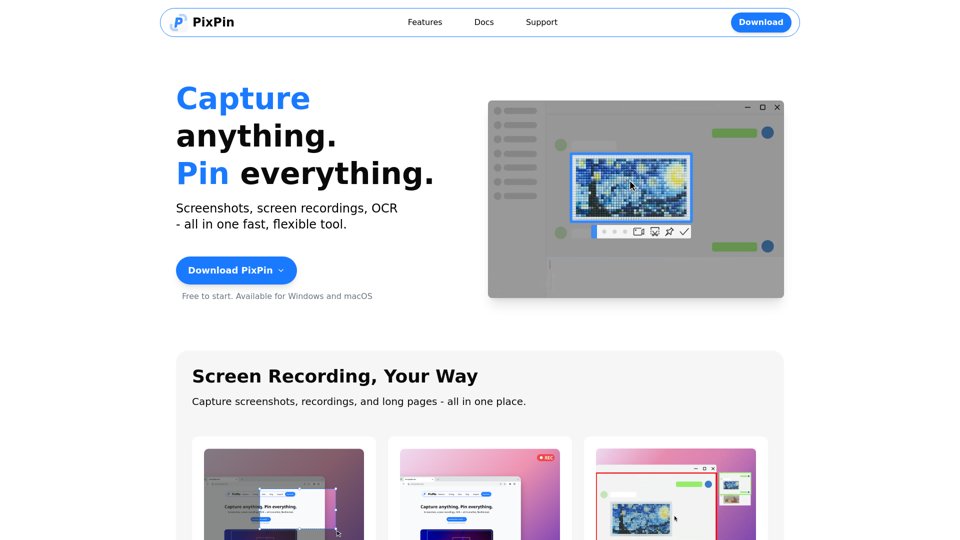
PixPin is a fast, flexible, all-in-one tool designed for capturing, recording, and extracting information from your screen. It combines powerful screenshot capabilities, screen recording, and OCR (Optical Character Recognition) into a single application, making it an essential utility for various digital tasks.

Main Purpose and Target User Group

Main Purpose
To streamline visual communication, documentation, and information extraction by providing comprehensive tools for screen capture, recording, and pinning content to the desktop. It aims to make everything on your screen part of your workflow.

Target User Group

  • Designers: For pinning mockups, UI references, and annotating design feedback.
  • Developers: For keeping API docs, logs, and errors on screen, and capturing bugs with screenshots or videos.
  • Product Managers: For documenting user flows, feedback threads, and using long captures and OCR for organization.
  • Customer Support: For recording issues step-by-step and highlighting screen areas to guide users visually.
  • Writers & Researchers: For extracting quotes with OCR and pinning visual notes or references.
  • Educators & Trainers: For creating annotated tutorials, demos, and explaining concepts clearly with screenshots and GIFs.
  • General Users: Anyone needing efficient screenshot, screen recording, or text extraction capabilities for daily work or personal use.

Function Details and Operations

  • Screenshots: Quickly capture windows, specific regions, UI elements, or full screens with smart auto-detection and flexible selection tools for pixel-perfect documentation and fast sharing.
  • Recordings: Record videos or GIFs with annotations, perfect for tutorials, software demonstrations, and process documentation.
  • Long Captures: Stitch together long pages, chats, or documents into a single image.
  • Pin to Screen: Pin images, text, colors, and files to your screen like digital sticky notes for instant reference and creative inspiration.
  • Extract Text from Image (OCR): Directly select and copy text from PixPin sticky notes or instantly extract text during screenshots. It's fast, simple, and accurate, eliminating manual retyping.
  • Annotation: Annotate screenshots and pinned notes with various tools including circles, markers, sequence numbers, and mosaic blur for hiding sensitive information, enabling clear visual communication.
  • Quick Pin Screenshot (PixPin Pro): A global mouse function (WIN + Drag Left Click) to quickly capture a screenshot in any software and pin it to the screen as a digital sticky note, offering effortless and immediate visual notes.
  • Action Recording (PixPin Pro): Record keystrokes and mouse clicks alongside screen recordings, ideal for creating crystal-clear tutorials and detailed process documentation.

User Benefits

  • Enhanced Productivity: Streamlines workflows by integrating multiple essential tools into one, reducing the need to switch between applications.
  • Clear Communication: Facilitates visual explanation with powerful annotation and recording features.
  • Effortless Information Extraction: Saves time and effort with accurate OCR capabilities, eliminating manual data entry.
  • Instant Reference: Keeps important information readily accessible on your screen with the "Pin to Screen" feature.
  • Versatility: Caters to a wide range of professional and personal needs, from design and development to customer support and education.
  • User-Friendly: Designed for ease of use with smart auto-detection and flexible selection tools.

Compatibility and Integration

  • Operating Systems: Available for Windows and macOS.
  • Workflow Integration: Designed to seamlessly integrate into existing workflows, making "everything on your screen part of your workflow."


PixPin -Frequently Asked Questions

What is PixPin?

PixPin is an all-in-one, fast, and flexible tool for screenshots, screen recordings, and OCR (Optical Character Recognition). It allows you to capture anything on your screen, pin visuals to your desktop, and annotate your content with ease.

What are the key features of PixPin?

PixPin offers a comprehensive set of features including smart screenshots (capturing windows, regions, or full screens), screen recording (videos and GIFs with annotations), long captures for scrolling pages, OCR to extract text from images, and the ability to pin images, text, colors, and files to your screen like sticky notes. It also includes robust annotation tools.

Is PixPin free to use?

Yes, PixPin is free to start. You can download and begin using its core features without any sign-up required. Some advanced features, like "Action Recording" and "Quick Pin Screenshot," are part of PixPin Pro.

On which operating systems can I use PixPin?

PixPin is available for both Windows and macOS.

How does PixPin's "Pin to desktop" feature work?

The "Pin to screen" feature allows you to pin images, text, colors, and files directly onto your desktop, acting as digital sticky notes. This provides instant visual reference and can help spark creativity. PixPin Pro also offers a "Quick Pin Screenshot" function (WIN + Drag Left Click) for immediate pinning of captured content.

Can PixPin extract text from images or screenshots?

Yes, PixPin includes an OCR (Optical Character Recognition) tool. You can directly select and copy text from your PixPin sticky notes or instantly extract text during the screenshot process, making it fast, simple, and accurate.

Does PixPin include a screen recorder?

Yes, PixPin features a screen recorder that allows you to capture videos or GIFs with annotations. For PixPin Pro users, there's also an "Action Recording" feature to record keystrokes and mouse clicks alongside your screen recording for detailed tutorials.

PixPin Support Email & Customer service contact & Refund contact etc.

Here is the PixPin support email for customer service: [email protected].

PixPin Login

PixPin does not require a login to start using the free version. You can download and use it directly.

PixPin Sign up

No sign-up is required to start using PixPin for free.

PixPin -Data Analysis

Latest Traffic Information

  • Monthly Visits

    -

  • Bounce Rate

    0.00%

  • Pages Per Visit

    0.00

  • Visit Duration

    00:00:00

  • Global Rank

    -

  • Country Rank

    -

Visits Over Time

Traffic Sources

  • direct:
    0.00%
  • referrals:
    0.00%
  • social:
    0.00%
  • mail:
    0.00%
  • search:
    0.00%
  • paidReferrals:
    0.00%
More data

PixPin - Alternative

Voxdeck

Voxdeck - AI-Powered Presentations: Instant Slides & Content Creation Productivity Tool

--
AI Formatter

AI Formatter - AI-Powered Data Formatting & Automated Data Cleaning

--
MakeBanner.ai

MakeBanner.ai - Free AI Banner Maker & Online Banner Design Tool

--
PixPin

PixPin - Screenshot Tool, Screen Recorder, OCR Screenshot & Pin to Desktop

--
More Tags about: PixPin