• Free Tools
  • Captions Generator

    Captions Generator - AI Subtitle Tool & Auto Caption Creator for Videos

    Captions Generator

    Captions Generator -Introduction

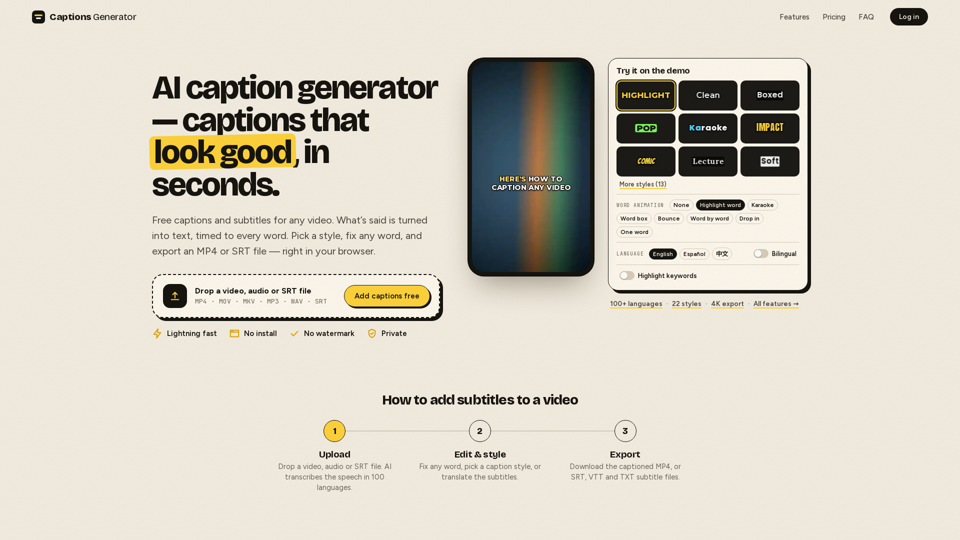
    Captions Generator is a powerful, browser-based tool designed to help creators add professional, high-quality subtitles to their videos in seconds. By leveraging advanced AI technology, the platform automatically transcribes speech in over 100 languages, ensuring every word is perfectly timed to your audio. Whether you are creating content for TikTok, Instagram Reels, or YouTube, this tool allows you to customize your captions with various styles, animations, and translations to keep your audience engaged. With a focus on speed and accessibility, Captions Generator enables you to export polished MP4 files or subtitle formats like SRT and VTT directly from your browser, all without the need for complex software installations or watermarks. It is the ideal solution for content creators looking to boost accessibility and viewer retention through data-driven, visually appealing video captions.

    Captions Generator -Features

    Overview

    Captions Generator is a powerful, browser-based AI subtitle tool designed to streamline the process of adding professional-looking captions to video content. By leveraging advanced AI, it automatically transcribes speech, synchronizes text to audio, and provides a suite of styling options to create engaging, accessible videos without the need for complex software installations.

    Function Details and Operations

    • Automated Transcription: Uses AI to transcribe speech in over 100 languages with automatic language detection.
    • Dynamic Caption Styles: Offers 22 unique styles, including karaoke, word-by-word highlighting, bounce, and neon effects.
    • Customization Tools: Allows users to fix any word, adjust fonts, change colors, and add hook titles that remain on-screen.
    • Bilingual Support: Supports translation into 100+ languages and offers bilingual captioning for global reach.
    • Flexible Exporting: Users can burn captions directly into the video (MP4) or download separate subtitle files (SRT, VTT, TXT).
    • Safe-Zone Optimization: Includes a built-in safe-zone checker to ensure captions remain visible on TikTok, Reels, and YouTube Shorts.

    User Benefits

    • Accessibility: Ensures content is inclusive for the hearing impaired and those watching without sound.
    • Increased Engagement: Captions are proven to stop the scroll, making content more effective for social media algorithms.
    • Efficiency: Eliminates manual typing and timing, allowing for professional results in seconds.
    • Privacy-First: Videos are processed locally in the browser, ensuring user data and media remain private.
    • No Watermarks: Provides a clean, professional look even on the free plan.

    Compatibility and Integration

    • Platform Compatibility: Works directly in any modern web browser with no installation required.
    • File Format Support: Accepts MP4, MOV, MKV, MP3, WAV, and SRT/VTT files.
    • Workflow Integration: Exported SRT/VTT files are fully compatible with professional editing software like Adobe Premiere, CapCut, and YouTube’s native player.
    Captions Generator -Frequently Asked Questions

    How can Captions Generator help improve my social media content?

    Captions Generator is a powerful AI subtitle tool that helps you create engaging, professional-looking videos in seconds. By automatically transcribing your audio and adding perfectly timed captions, you can increase viewer retention, make your content accessible to a wider audience, and ensure your videos are optimized for platforms like TikTok, Reels, and YouTube Shorts.

    Is Captions Generator an auto caption creator?

    Yes, it is a fully automated AI subtitle tool. Simply upload your video, audio, or SRT file, and the software will automatically transcribe the speech in over 100 languages, time every word to the audio, and allow you to style your captions with various animations and fonts.

    Can I use Captions Generator as video transcription software?

    Absolutely. Beyond adding burned-in captions to your videos, you can use the platform to generate accurate transcripts. You can download these as SRT, VTT, or TXT files, making it an excellent video transcription software for repurposing content or creating accessibility files for your media.

    Is my data secure when using this AI subtitle tool?

    Yes. Your privacy is a priority; your video never leaves your device because the captions are rendered directly in your browser. Only the audio track is processed for transcription, and your files are not stored on our servers.

    Captions Generator -Data Analysis

    Latest Traffic Information

    • Monthly Visits

      -

    • Bounce Rate

      0.00%

    • Pages Per Visit

      0.00

    • Visit Duration

      00:00:00

    • Global Rank

      -

    • Country Rank

      -

    Visits Over Time

    Traffic Sources

    • direct:
      0.00%
    • referrals:
      0.00%
    • social:
      0.00%
    • mail:
      0.00%
    • search:
      0.00%
    • paidReferrals:
      0.00%
    More data

    Captions Generator - Alternative

    Qwen 3

    Qwen 3 - QwenLM: Open Source Large Language Model AI

    --
    Clideo

    Clideo - Online Video Editor & Maker - Free Video Tools

    --
    AI Scholar GPT

    AI Scholar GPT - Free AI-Powered Academic Research Tool & Assistant

    --
    1Scholar AI

    1Scholar AI - All-in-One Academic Research Tool and AI Literature Review Assistant

    --
    More Tags about: Captions Generator