• Free Tools
  • AtAt

    AtAt - Mobile App Development and Software Solutions for Digital Transformation

    AtAt

    AtAt -Introduction

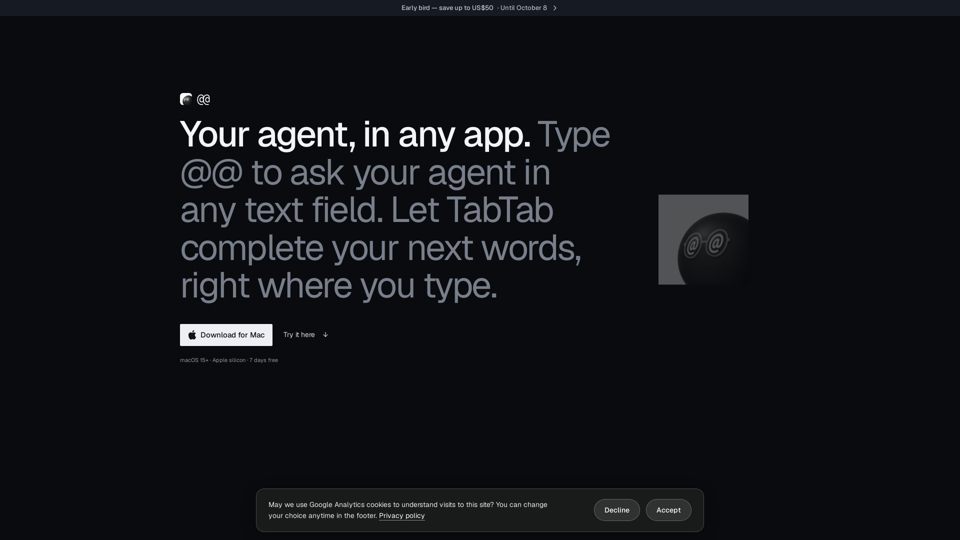
    AtAt is a powerful, native macOS application designed to serve as your personal AI agent directly within any text field. By simply typing "@@," you can trigger your preferred AI model to generate responses, draft emails, or provide feedback without ever leaving your current workflow. Beyond its intelligent text capabilities, AtAt functions as a comprehensive productivity suite, offering advanced screen capture tools, seamless clipboard history management, and intuitive text-selection actions. Built specifically for Apple silicon, the app prioritizes privacy by keeping your data local and allowing you to bring your own API keys or local models. Whether you are looking to streamline your writing with TabTab suggestions or capture and edit screenshots with ease, AtAt integrates effortlessly into your Mac environment, helping you stay focused and efficient without switching between multiple applications.

    AtAt -Features

    AtAt Overview

    AtAt is a powerful, native macOS application designed to act as an intelligent agent directly within your existing workflow. By integrating seamlessly into any text field or application, AtAt eliminates the need to switch between windows, allowing users to leverage AI-driven assistance, advanced screen capture, and clipboard management without leaving their current task.

    • Function Details and Operations

      • @@ Trigger: Type "@@" in any text field to summon your agent, ask questions, or generate content directly where you are typing.
      • TabTab Completion: An intelligent text completion feature that suggests the next words in your emails, documents, or code.
      • Native Screen Capture: A comprehensive suite for screenshots and screen recordings, including area, window, and scrolling capture, plus built-in OCR and editing tools.
      • Clipboard History: A searchable, persistent history of your copied items, allowing you to quickly retrieve and paste previous content.
      • Selection Actions: Select any text to rewrite, explain, or process it using your chosen AI agent.
      • Cross-App Continuity: Easily move tasks from your current app to a terminal or another agent-based application.
    • User Benefits

      • Contextual Efficiency: Stay in your flow by interacting with AI agents directly inside your active application.
      • Privacy-First Design: Data stays on your Mac by default. AtAt does not act as a middleman for your prompts; they go directly to your chosen provider.
      • Flexibility: Use your own API keys (OpenAI, Anthropic, etc.) or local models via Ollama, ensuring you have full control over your AI environment.
      • Native Performance: Built as a native macOS app (no Electron), ensuring a lightweight, fast, and responsive experience.
    • Compatibility and Integration

      • System Requirements: Requires Apple silicon Mac running macOS 15 or later.
      • Agent Support: Works out-of-the-box with Claude Code, Codex, Grok, Cursor, Pi, Hermes, and more. Supports custom CLI providers and local models via Ollama.
      • App Integration: Functions in any editable, non-secure text field across macOS, including browsers, code editors, and messaging apps.
    • Access and Activation Method

      • Download: Available directly via the official website (atatapp.com) or via Homebrew (brew install --cask xinyao27/tap/atat).
      • Trial: Users can start with a 7-day free trial without requiring an account or payment card.
      • Activation: After the trial, users can choose between monthly, yearly, or lifetime plans. Activation is managed via a simple sign-in process, allowing the software to be used on up to three Macs simultaneously.

    AtAt -Frequently Asked Questions

    What is AtAt and how does it improve my workflow?

    AtAt is a native macOS application designed to act as your personal agent within any app. By typing @@ in any text field, you can trigger your chosen AI agent to draft emails, provide feedback, or complete text. Beyond AI integration, AtAt serves as a powerful productivity suite featuring advanced screen capture, clipboard history, and text selection actions, allowing you to stay in your flow without switching windows.

    Which AI agents and models are compatible with AtAt?

    AtAt is highly flexible, allowing you to "bring your own agent." It works out of the box with Claude Code, Codex, Grok, Cursor, Pi, Hermes, OpenCode, and Antigravity. You can also integrate your own API keys from providers like OpenAI, Anthropic, or DeepSeek, or run local models via Ollama.

    Is my data private when using AtAt?

    Yes. AtAt is designed with privacy as a priority. Your history, clipboard data, and settings remain on your Mac by default. AtAt does not act as a middleman; your prompts and context are sent directly from your Mac to your chosen provider. Optional iCloud Sync is available but must be manually enabled, and it uses your private iCloud container rather than an AtAt server.

    Do I need an AI agent to benefit from AtAt?

    No. Even without an AI agent, AtAt is a robust utility for macOS. It provides a comprehensive screenshot tool (with area, window, and scrolling capture), screen recording, OCR capabilities, a searchable clipboard history, and an action bar for selected text.

    How can I contact AtAt support?

    For general inquiries, billing questions, or support, you can reach the team at: [email protected]. You can also join the community and get help via the official AtAt Discord server.

    How do I download and install AtAt?

    You can download the latest version of AtAt for macOS directly from the official website at https://atatapp.com/download. For users who prefer using Homebrew, you can install it via the command line using: brew install --cask xinyao27/tap/atat.

    How does AtAt pricing and account management work?

    AtAt offers a 7-day free trial with no payment card required. After the trial, you can choose between a subscription or a lifetime license. You can manage your account, sign in, and unlock your features on up to three Macs by visiting the account section at https://atatapp.com.

    AtAt -Data Analysis

    Latest Traffic Information

    • Monthly Visits

      215

    • Bounce Rate

      53.80%

    • Pages Per Visit

      1.46

    • Visit Duration

      00:00:42

    • Global Rank

      -

    • Country Rank

      -

    Visits Over Time

    Traffic Sources

    • direct:
      32.60%
    • referrals:
      10.90%
    • social:
      0.00%
    • mail:
      4.80%
    • search:
      0.00%
    • paidReferrals:
      0.00%
    More data

    AtAt - Alternative

    Celebrity Look Alike

    Celebrity Look Alike - AI Face Match & Celeb Doppelganger Finder

    --
    Sora Video Downloader

    Sora Video Downloader - Free Sora AI Video Download & Content Downloader

    --
    Liftburst

    Liftburst - SEO Product Summary: Keyword Density & SEO-Friendly Titles

    --
    Social Echo AI

    Social Echo AI - Advanced Social Media Management & AI Marketing Solutions

    --
    More Tags about: AtAt