AI Toolbox Video Splitter

AI Toolbox Video Splitter - Automated AI Video Cutter & Online Video Segmentation Tool

AI Toolbox Video Splitter

AI Toolbox Video Splitter -Introduction

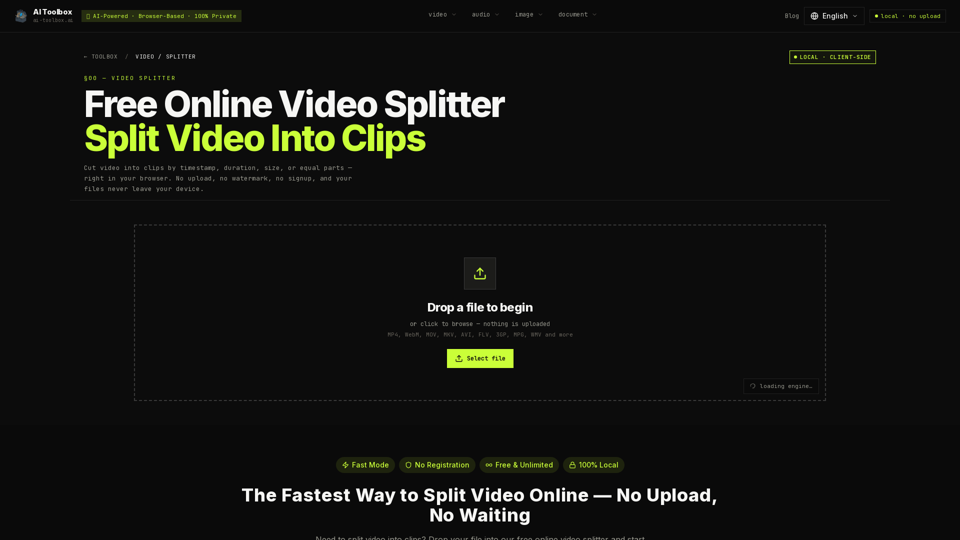
AI Toolbox Video Splitter is a high-performance, browser-based tool designed to help users divide video files into clips with maximum efficiency and privacy. By leveraging advanced WebAssembly-compiled FFmpeg technology, the platform allows you to cut videos by timestamp, duration, file size, or equal parts directly within your browser. Unlike traditional cloud-based editors that require time-consuming uploads and server processing, this tool operates entirely on your local device. This ensures that your footage remains 100% private and secure, as no data ever leaves your machine. Whether you need to prepare content for social media or organize long-form recordings, AI Toolbox Video Splitter provides a seamless, registration-free experience that eliminates file size caps and waiting times. With its intuitive interface and support for a wide range of formats, it is the ideal solution for users seeking a fast, reliable, and professional-grade video splitting workflow.

AI Toolbox Video Splitter -Features

Overview

AI Toolbox Video Splitter is a high-performance, browser-based AI video editing tool designed for rapid, secure, and private media processing. By leveraging WebAssembly-compiled FFmpeg, it allows users to perform complex video segmentation directly within their web browser without the need for server uploads, registrations, or software installations.

Main Purpose and Target User Group

  • Main Purpose: Provide an automated video cutter that enables users to split long-form footage into manageable clips based on time, size, or equal segments.
  • Target User Group: Content creators, social media managers (TikTok, Instagram, YouTube Shorts), students, and professionals who require a fast, private, and watermark-free solution for segmenting videos without compromising data security.

Function Details and Operations

  • Four Splitting Modes
    • Manual Split: Precise frame-level control using a visual waveform and timeline markers.
    • Equal Parts: Automatically divides long videos (e.g., lectures) into uniform chapters.
    • Split by Duration: Cuts video into fixed-length intervals (e.g., 30-second clips).
    • Split by Size: Segments videos based on target file size, ideal for meeting platform upload limits.
  • Processing Modes
    • Fast Mode: Utilizes stream copy technology for near-instant splitting without re-encoding, preserving original quality.
    • Advanced Mode: Allows for re-encoding, providing frame-perfect accuracy and the ability to change output formats (MP4, WebM, MOV, MKV, AVI, etc.) and quality settings.
  • Format Support: Compatible with a wide range of formats including MP4, WebM, MOV, MKV, AVI, FLV, 3GP, MPG, and WMV.

User Benefits

  • 100% Privacy: Files never leave the user's device. Processing occurs locally, ensuring sensitive or confidential footage remains secure.
  • No Uploads/No Waiting: Eliminates the time-consuming process of uploading large files to a cloud server.
  • Zero Watermarks: Users receive clean, professional-grade clips without branding overlays.
  • Unlimited Usage: No file size caps or server quotas; processing is limited only by the user's local hardware capabilities.
  • Efficiency: Fast Mode offers up to 10x faster processing compared to traditional cloud-based video splitters.

Compatibility and Integration

  • Browser Compatibility: Optimized for Chromium-based browsers (Chrome, Edge, Brave) for the best performance.
  • Cross-Platform: Works on desktop and mobile devices (Android/Chrome recommended).
  • Local Processing: Operates entirely offline once the page is loaded, utilizing the user's CPU for WebAssembly-based FFmpeg tasks.

Access and Activation Method

  • Access: The tool is accessible directly via the web browser at https://ai-toolbox.ai/tools/video-splitter.
  • Activation: No account registration, login, or subscription is required. Users simply drag and drop their video files into the browser interface to begin processing immediately.
AI Toolbox Video Splitter -Frequently Asked Questions

What is the AI Toolbox Video Splitter?

The AI Toolbox Video Splitter is a professional-grade, browser-based AI video editing tool that allows you to cut and segment videos directly on your device. Because it uses advanced automated video cutter technology, your files are processed locally, ensuring 100% privacy and zero upload wait times.

How does the AI-powered media processing work?

Our tool utilizes WebAssembly-compiled FFmpeg to perform high-speed, AI-powered media processing directly in your browser. This means you can perform online video segmentation without ever sending your footage to a remote server, making it the fastest and most secure way to split video files.

Is the AI Toolbox Video Splitter free to use?

Yes, the AI Toolbox Video Splitter is completely free. There is no registration required, no watermarks added to your clips, and no hidden fees for processing large files.

Can I split videos without losing quality?

Absolutely. By using "Fast Mode," the tool performs a stream copy, which splits your video without re-encoding. This ensures that the output quality is bit-for-bit identical to your source file, providing a lossless editing experience.

Does this tool work on all devices?

The AI Toolbox Video Splitter is optimized for desktop browsers like Chrome, Edge, and Brave for the best performance. While it works on mobile devices, performance may vary depending on your browser's ability to handle local media processing.

AI Toolbox Video Splitter -Data Analysis

Latest Traffic Information

  • Monthly Visits

    -

  • Bounce Rate

    0.00%

  • Pages Per Visit

    0.00

  • Visit Duration

    00:00:00

  • Global Rank

    -

  • Country Rank

    -

Visits Over Time

Traffic Sources

  • direct:
    0.00%
  • referrals:
    0.00%
  • social:
    0.00%
  • mail:
    0.00%
  • search:
    0.00%
  • paidReferrals:
    0.00%
More data

AI Toolbox Video Splitter - Alternative

Pixel Dance AI

Pixel Dance AI - Cinematic AI Video with ByteDance AI Model

--
YT5s YouTube Video Downloader

YT5s YouTube Video Downloader - Free YouTube to MP4/MP3 Converter and Fast Downloader

--
Y2Meta YouTube Downloader

Y2Meta YouTube Downloader - Free YouTube Downloader & Converter to MP3/MP4 (1080p, 4k)

--
AI Video Generator

AI Video Generator - VEED.IO Online Video Editor for Free Video Editing and Captions

--
More Tags about: AI Toolbox Video Splitter