Video Compressor

Video Compressor - Online Video Size Reducer to Compress Video Files and Reduce Video File Size

Video Compressor

Video Compressor -Introduction

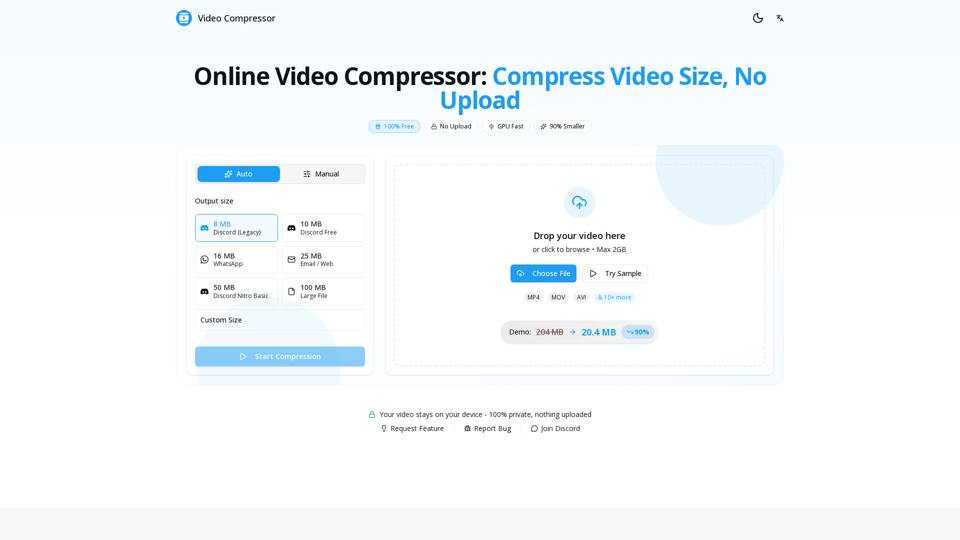
Video Compressor is a high-performance, browser-based tool designed to help users shrink video file sizes by up to 90% without compromising visual quality. By leveraging advanced GPU acceleration and local processing, this platform ensures that your files are compressed directly on your device, guaranteeing 100% privacy as no data is ever uploaded to external servers. Whether you need to meet specific file size requirements for Discord, WhatsApp, or email, or simply want to save storage space on your device, Video Compressor provides a seamless, watermark-free experience. With support for all major formats like MP4, MOV, and MKV, it offers a fast, secure, and completely free solution for creators, gamers, and professionals looking to optimize their media instantly.

Video Compressor -Features

Overview

The Video Compressor is a high-performance, browser-based video compression tool designed to reduce video file size without compromising visual quality. It operates entirely locally on the user's device, ensuring maximum privacy and security by eliminating the need for file uploads to external servers.

Main Purpose and Target User Group

The primary purpose of this tool is to provide a fast, free, and secure way to compress video files for various platforms. It is specifically designed for:

  • Content Creators: Needing to shrink large files for social media or client delivery.
  • Gamers and Streamers: Requiring specific file sizes for Discord, Twitter, and other platforms.
  • General Users: Looking to reduce video file size for email attachments, WhatsApp, or storage optimization on mobile devices.

Function Details and Operations

  • Local Processing: Utilizes WebCodecs API to process files directly in the browser, ensuring zero data sharing.
  • GPU Acceleration: Leverages the user's device hardware to achieve compression speeds up to 10x faster than standard CPU methods.
  • Flexible Presets: Offers one-click optimization for Discord (8MB, 10MB, 25MB, 50MB, 100MB), WhatsApp, and Email.
  • Manual Controls: Provides advanced users the ability to fine-tune resolution, bitrate, and frame rate for custom output requirements.
  • Broad Format Support: Compatible with MP4, WebM, MOV, MKV, AVI, WMV, FLV, and more, outputting optimized H.264 MP4 files.

User Benefits

  • 100% Privacy: Since no files are uploaded, your data remains strictly on your device.
  • Cost-Effective: A completely free service with no hidden fees, subscriptions, or watermarks.
  • Efficiency: Dramatically reduces file sizes (up to 90% reduction) while maintaining high visual clarity.
  • Convenience: No software installation, registration, or account creation required.

Compatibility and Integration

  • Browser-Based: Works seamlessly on all modern web browsers, including Chrome, Safari, Firefox, and Edge.
  • Cross-Platform: Fully functional on both desktop computers and mobile devices (iOS/Android).
  • Platform Optimized: Specifically engineered to meet the strict file size limits of Discord, Telegram, Twitter, and messaging apps.

Access and Activation Method

The tool is accessible instantly via the official website (https://videocompressors.com/). Users simply drag and drop their video files into the browser interface, select their desired preset or custom settings, and click "Start Compression" to download the optimized file immediately. No activation or sign-up is required.

Video Compressor -Frequently Asked Questions

What is the best online video size reducer?

The best online video size reducer is one that prioritizes both quality and privacy. Our Video Compressor stands out because it processes your files locally in your browser, meaning your data is never uploaded to a server. It is 100% free, requires no sign-up, and supports all major formats like MP4, MOV, and AVI.

How can I compress video files without losing quality?

To compress video files while maintaining visual clarity, our tool uses smart algorithms to optimize the bitrate and codec. For the best results, use our "Auto" mode, which intelligently balances file size and quality. If you need manual control, you can adjust the resolution and bitrate settings to find the perfect balance for your specific needs.

Is this video compression tool safe to use?

Yes, it is completely safe. Unlike other online tools that require you to upload your videos to a cloud server, our video compression tool performs all operations directly within your web browser. Your files never leave your device, ensuring 100% privacy and security for your personal or professional content.

Can I use this tool to reduce video file size for Discord or WhatsApp?

Absolutely. We provide built-in presets tailored for popular platforms. You can easily reduce video file size to meet the specific requirements for Discord (8MB, 25MB, 50MB, etc.) or WhatsApp (16MB) with just a few clicks, ensuring your videos are always ready to share.

Does the video compressor support large files?

Yes, there is no hard file size limit. Because our tool utilizes your device's hardware and GPU acceleration, you can process large files directly in your browser. The only limitation is the available memory on your specific device.

Video Compressor -Data Analysis

Latest Traffic Information

  • Monthly Visits

    -

  • Bounce Rate

    0.00%

  • Pages Per Visit

    0.00

  • Visit Duration

    00:00:00

  • Global Rank

    -

  • Country Rank

    -

Visits Over Time

Traffic Sources

  • direct:
    0.00%
  • referrals:
    0.00%
  • social:
    0.00%
  • mail:
    0.00%
  • search:
    0.00%
  • paidReferrals:
    0.00%
More data

Video Compressor - Alternative

MaxAI.me

MaxAI.me - Chat with Any Webpage, Read Faster, Write Better

--
PixVerse AI

PixVerse AI - AI Video Creator & Generator App on App Store & Google Play

--
Image to Video AI

Image to Video AI - Flux AI Video Generator | Online Image to Video AI Generator

--
Flux AI Image Generator

Flux AI Image Generator - Free Online Advanced AI Image Generator

--
More Tags about: Video Compressor