Overview
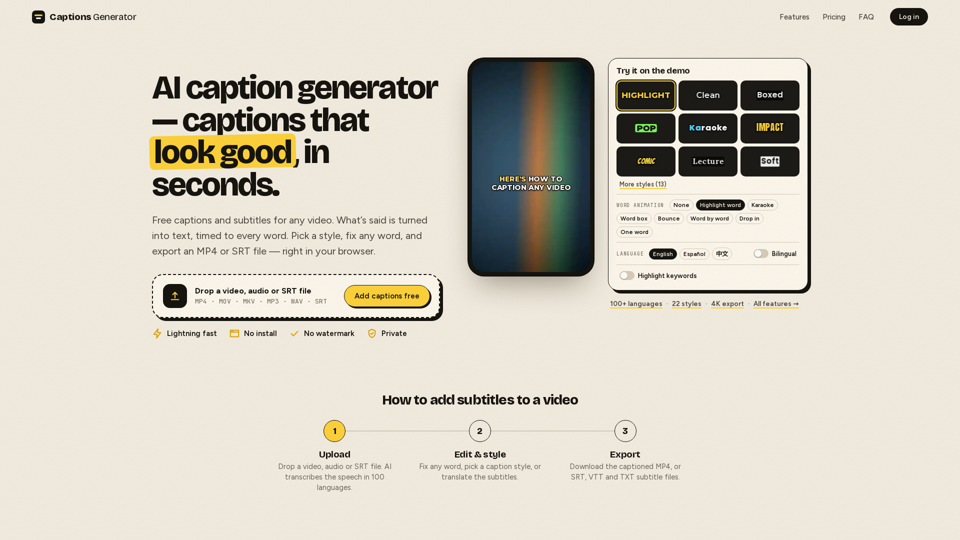
Captions Generator is a powerful, browser-based AI subtitle tool designed to streamline the process of adding professional-looking captions to video content. By leveraging advanced AI, it automatically transcribes speech, synchronizes text to audio, and provides a suite of styling options to create engaging, accessible videos without the need for complex software installations.
Function Details and Operations
- Automated Transcription: Uses AI to transcribe speech in over 100 languages with automatic language detection.
- Dynamic Caption Styles: Offers 22 unique styles, including karaoke, word-by-word highlighting, bounce, and neon effects.
- Customization Tools: Allows users to fix any word, adjust fonts, change colors, and add hook titles that remain on-screen.
- Bilingual Support: Supports translation into 100+ languages and offers bilingual captioning for global reach.
- Flexible Exporting: Users can burn captions directly into the video (MP4) or download separate subtitle files (SRT, VTT, TXT).
- Safe-Zone Optimization: Includes a built-in safe-zone checker to ensure captions remain visible on TikTok, Reels, and YouTube Shorts.
User Benefits
- Accessibility: Ensures content is inclusive for the hearing impaired and those watching without sound.
- Increased Engagement: Captions are proven to stop the scroll, making content more effective for social media algorithms.
- Efficiency: Eliminates manual typing and timing, allowing for professional results in seconds.
- Privacy-First: Videos are processed locally in the browser, ensuring user data and media remain private.
- No Watermarks: Provides a clean, professional look even on the free plan.
Compatibility and Integration
- Platform Compatibility: Works directly in any modern web browser with no installation required.
- File Format Support: Accepts MP4, MOV, MKV, MP3, WAV, and SRT/VTT files.
- Workflow Integration: Exported SRT/VTT files are fully compatible with professional editing software like Adobe Premiere, CapCut, and YouTube’s native player.