AI Tattoo Video Generator

AI Tattoo Video Generator - Free AI Tattoo Design & Creator with TattooAI

AI Tattoo Video Generator

AI Tattoo Video Generator -Introduction

Unleash the full potential of your tattoo concepts with the AI Tattoo Video Generator. This innovative tool transforms your static tattoo designs into captivating, dynamic videos, offering an unprecedented way to visualize your ink before it becomes a permanent part of you. Experience your designs coming to life with realistic movement and skin-conforming effects, providing a clear and comprehensive preview that static images simply can't match.

AI Tattoo Video Generator -Features

Overview

The AI Tattoo Video Generator by TattooAI.Design is an innovative tool that transforms static tattoo designs into dynamic, realistic videos. It allows users to preview how a tattoo will look and move on the skin before getting inked, enhancing the decision-making process for both individuals and tattoo artists.

Main Purpose and Target User Group

Main Purpose
To animate tattoo designs into realistic videos, simulating skin effects, movement, and layout to aid in informed decision-making before getting a tattoo. It aims to bridge the gap between imagination and reality for tattoo designs.

Target User Group

  • Individuals considering a new tattoo who want to visualize the design on their body.
  • Tattoo artists looking for a tool to showcase designs to clients, facilitate discussions, and confirm placement/style.
  • Designers and artists creating tattoo concepts who need dynamic presentation tools.

Function Details and Operations

Input Methods

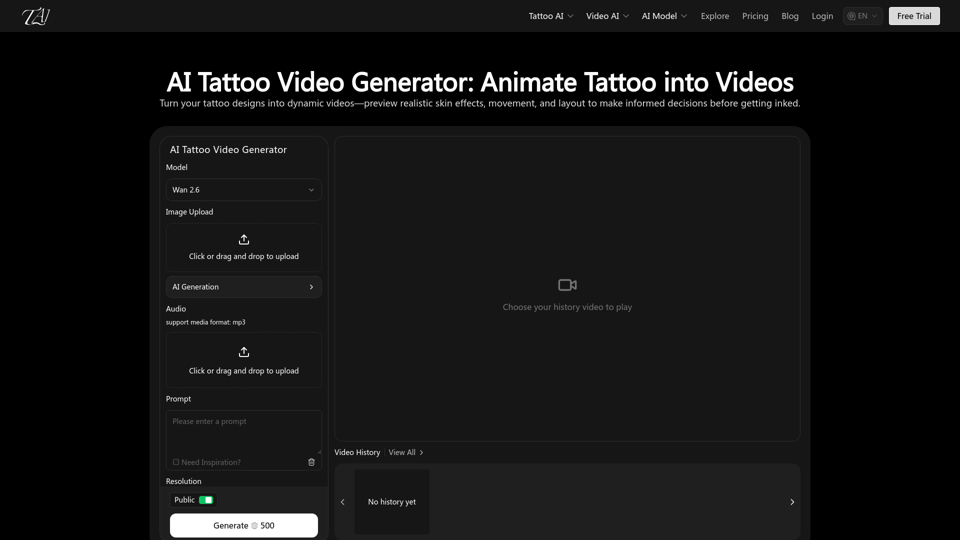
  • Image Upload: Users can upload existing tattoo designs or AI-generated images.
  • Text Prompt: Users can describe their desired tattoo and its animation.
  • Audio Upload: Supports MP3 format for adding audio to the video.

AI Model Integration
Utilizes the WAN 2.6 Video AI model for generating dynamic tattoo videos.

Resolution Options
Offers 720p and 1080p video output.

Duration Options
Provides video lengths of 5s, 10s, and 15s.

Aspect Ratio Options
Supports 16:9, 9:16, 1:1, 4:3, and 3:4 ratios.

Tattoo Design Video Presentation
Converts static art into videos demonstrating line flow, proportions, and overall layout dynamics.

Skin-Conforming Simulation
Intelligently simulates skin curvature and subtle body movements for realistic previews.

Multi-Angle & Detail Display
Videos feature pacing and camera changes to reveal tattoos from various angles, highlighting intricate details and overall harmony.

Video History
Stores generated videos for easy access and review.

Examples and Inspiration
Provides inspiring video samples created by the AI Tattoo Video Generator.

Easy-to-Use Interface
Features a straightforward drag-and-drop interface for uploads and clear options for customization.

User Benefits

  • Enhanced Realism: Provides a more realistic preview of tattoos compared to static images, emphasizing how they will appear on moving skin.
  • Reduced Imagination Cost: Minimizes guesswork by showing the dynamic effect, aligning expectations with reality.
  • Faster Design Confirmation: Enables quick assessment of placement, scale, and style, reducing revision time.
  • Better for Complex Designs: Facilitates understanding of layers and rhythm in intricate or structurally complex tattoos.
  • Informed Decision-Making: Helps users make confident decisions before getting inked.
  • Improved Communication: Offers a visual reference for discussions with tattoo artists, streamlining the collaboration process.
  • Shareable Format: Exports video files for effortless saving and sharing across various platforms.
  • Creative Showcases: Ideal for presenting original tattoo ideas or archiving personal design progress.

Compatibility and Integration

Input Compatibility
Accepts image uploads (likely common formats like JPG, PNG) and text prompts.

Output Compatibility
Generates standard video file formats (implied, likely MP4) that are widely shareable and viewable.

Integration with TattooAI.Design Ecosystem
Part of a broader suite of AI tattoo tools including AI Tattoo Generator, AI Tattoo Try On, and AI Tattoo Design Generator.

Access and Activation Method

Access
Available through the TattooAI.Design website.

Activation Method
Users can start a "Free Trial" to access the generator. Specific details on subscription models or credit systems are likely found on the pricing page.

Login
Requires user login to access and manage generated content.
AI Tattoo Video Generator -Frequently Asked Questions

What is the AI Tattoo Video Generator?

The AI Tattoo Video Generator is a tool from TattooAI that allows you to transform your tattoo designs into dynamic videos. It helps you preview realistic skin effects, movement, and layout of a tattoo before getting it inked, reducing the guesswork and improving decision-making.

How does the AI Tattoo Video Generator work?

You can either upload an image of your tattoo design or provide a text description (prompt). The AI then generates a video that simulates how the tattoo would look on skin, including subtle body movements and different angles. You can also add audio and choose resolution, duration, and aspect ratio.

What are the key features of the AI Tattoo Video Generator?

Key features include seamless end-to-end video generation, tattoo design video presentation (converting designs into videos demonstrating line flow and proportions), skin-conforming simulation (realistic appearance on skin curvature), and multi-angle & detail display.

Why should I choose the AI Tattoo Video Generator over static images?

Unlike static images, the AI Tattoo Video Generator emphasizes realism and helps you quickly and clearly understand tattoo effects. It lowers imagination cost, provides faster design confirmation, and is better for visualizing complex designs by showing layers and rhythm.

What are the primary use cases for the generated videos?

The generated videos are ideal for confirming tattoo designs before inking, collaborating with tattoo artists (as a visual reference for adjustments), and showcasing creative concepts or personal records of tattoo ideas.

Does the AI Tattoo Video Generator only support a single tattoo style?

No, the AI Tattoo Video Generator is designed to work with a wide variety of tattoo styles. You can explore many popular styles created with Tattoo AI Design, such as Fineline, Japanese, Realism, Geometric, and various animal and plant motifs.

Are the videos suitable for communicating with tattoo artists?

Yes, the videos are highly suitable for communicating with tattoo artists. They provide a clear and dynamic visual reference to discuss line tweaks, placement adjustments, or stylistic refinements, ensuring both you and your artist are on the same page.

What AI models are used in the AI Tattoo Video Generator?

The AI Tattoo Video Generator utilizes the WAN 2.6 Video AI model for creating dynamic tattoo videos.

AI Tattoo Video Generator -Data Analysis

Latest Traffic Information

  • Monthly Visits

    -

  • Bounce Rate

    0.00%

  • Pages Per Visit

    0.00

  • Visit Duration

    00:00:00

  • Global Rank

    -

  • Country Rank

    -

Visits Over Time

Traffic Sources

  • direct:
    0.00%
  • referrals:
    0.00%
  • social:
    0.00%
  • mail:
    0.00%
  • search:
    0.00%
  • paidReferrals:
    0.00%
More data

AI Tattoo Video Generator - Alternative

Leonardo AI

Leonardo.ai: Transform your projects with Leonardo AI, the AI image generator that creates high-quality images and videos with unparalleled speed and style. Elevate your creative vision with generative AI for computer games and more.

--
Cutout

Cutout.pro: Cutout.Pro is an all-in-one visual design platform offering AI-powered photo and video editing tools. Easily remove backgrounds, restore images, and create graphics with just one click. Transform your design ideas into unique assets efficiently.

--
Invideo AI

Invideo.io: Create stunning videos effortlessly with Invideo AI. Perfect for content creators, YouTubers, and marketers, Invideo AI provides a seamless solution to transform your concepts into high-quality videos using artificial intelligence.

--
CapCut Online Creative Suite

Capcut.com: Discover the CapCut Online Creative Suite, your ultimate online video editor equipped with advanced video editing tools and AI-powered creative platform. Enhance your projects with our innovative graphic design tool, collaborate seamlessly with your team, and unlock endless creative possibilities. Experience the future of video editing and design with CapCut today!

--
More Tags about: AI Tattoo Video Generator