Wan 2.6 AI Video Generator
Overview
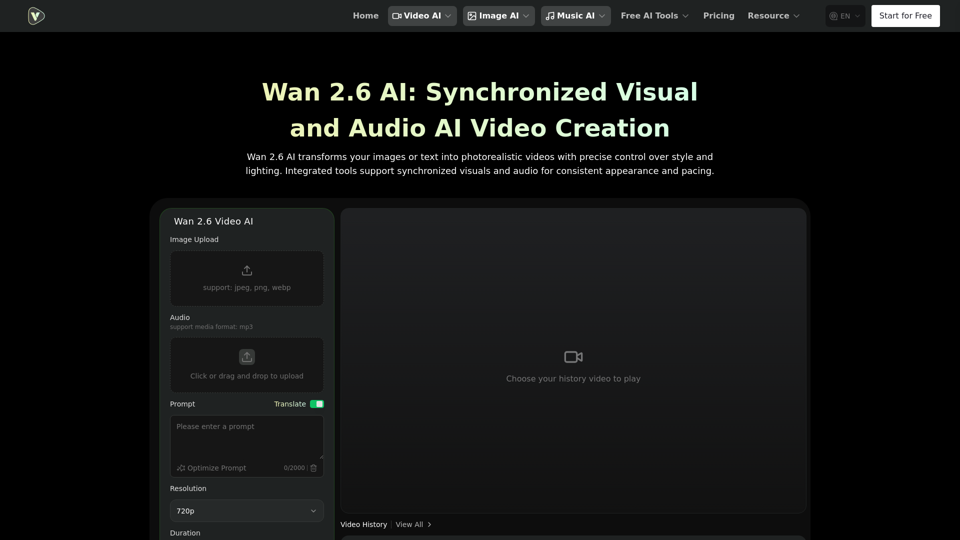
Wan 2.6 AI Video Generator is an advanced AI-powered platform designed to transform images or text into photorealistic videos with precise control over style, lighting, and synchronized audio. It streamlines the video creation process by automating dynamic video sequences and audio generation from simple prompts or uploaded assets, aiming to deliver structurally complete results with minimal post-editing.
Main Purpose and Target User Group
The main purpose of Wan 2.6 AI is to simplify and accelerate the creation of high-quality, synchronized videos, particularly short-form content. It targets creators, marketers, and individuals who need to produce engaging video content efficiently without extensive video editing skills or complex workflows. It's ideal for those who work with defined image or audio assets and seek structured, predictable video production.
Function Details and Operations
- Image-to-Video Sequencing: Utilizes static images as the foundation for video creation, automatically adding camera movements and transitions to form cohesive video clips.
- Text-to-Video Generation: Converts textual prompts into captivating video sequences and audio, injecting dynamic energy and narrative depth.
- Synchronized Visuals and Audio: Integrates tools to ensure visuals and audio are perfectly synchronized, maintaining consistent appearance and pacing throughout the video. Audio files serve as key timing references, adapting visual sequence lengths and scene timing.
- Photorealistic Video Portraits: Generates photorealistic video portraits with lifelike textures and meticulous lighting.
- Integrated Text and Graphics Generation: Supports dynamic layouts, including charts and posters, all synchronized with audio.
- Reference Character & Multi-Person Interactions: Enables casting characters from reference videos into new scenes, supporting human and human-like figures. It ensures consistent appearance, voice, and pacing for multi-person and human-object interactions.
- Segmented Scene Organization: Automatically divides videos into multiple visual segments, arranging distinct scenes or compositions to maximize information in short videos.
- Stable Key Element Consistency: Maintains consistent appearance for people and important objects across all scenes, minimizing distracting changes.
- Asset-Driven Workflow: Focuses on a "materials first" approach, ideal for workflows with defined image or audio assets (JPEG, PNG, WebP for images; MP3 for audio).
- Resolution Options: Offers various resolution settings including 720p and 1080p.
- Duration Control: Allows users to set video durations (e.g., 5s, 10s, 15s).
- Aspect Ratio Selection: Provides multiple aspect ratio options (16:9, 9:16, 1:1, 4:3, 3:4).
- Prompt Optimization: Includes a feature to optimize user prompts for better video generation.
User Benefits
- Streamlined Creation: Simplifies video production by automating complex tasks, reducing the need for traditional editing tools and multiple assets.
- High-Quality Output: Delivers photorealistic videos with precise control over style, lighting, and consistent character appearance.
- Audio-Visual Harmony: Ensures perfect synchronization between visuals and audio, leading to more engaging and professional-looking content.
- Reduced Post-Editing: Generates structurally complete videos that are often ready for direct sharing or publishing, saving time and effort.
- Creative Control: Offers precise control over artistic style, character consistency, and scene dynamics.
- Efficiency for Short-Form Video: Optimized for short video lengths, maximizing the quality and impact of each project.
- Accessibility: Allows users to create videos without advanced technical skills, making video creation accessible to a wider audience.
Compatibility and Integration
- Input Formats: Supports common image formats (JPEG, PNG, WebP) and audio formats (MP3).
- Platform: Web-based AI video generator, accessible through a browser.
Access and Activation Method
Users can access Wan 2.6 AI Video Generator directly through the Videoweb.ai platform. The process involves:
- Uploading images (JPEG, PNG, WebP) or entering a text prompt.
- (Optional) Uploading audio (MP3).
- Setting resolution, duration, and ratio.
- Clicking "Generate" to create the video.
A "Start for Free" option is available, indicating a freemium model or a free trial.