Overview
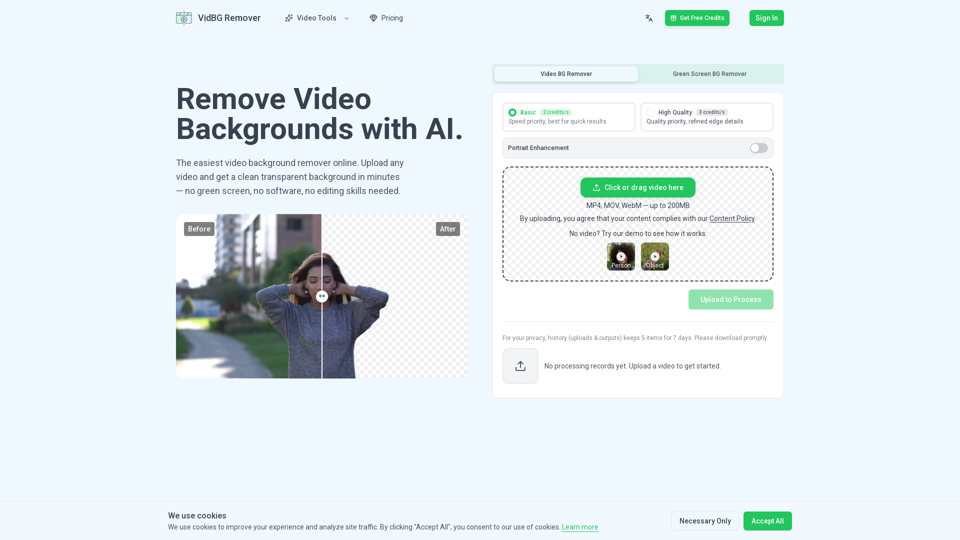
Vid BG Remover is a cutting-edge, AI-powered video editing tool designed to simplify the process of removing backgrounds from video footage. By eliminating the need for green screens, complex software, or advanced editing skills, it provides a streamlined, cloud-based solution for creating professional-grade transparent videos in minutes.
Main Purpose and Target User Group
The primary purpose of Vid BG Remover is to provide high-quality, stable, and flicker-free video background removal for various digital content needs. It is specifically designed for:
- Content Creators & YouTubers: For creating professional talking-head videos and memes.
- E-commerce Businesses: For creating versatile product and model ads.
- Educators & Course Creators: For layering presenters cleanly over slides.
- Video Editors & Agencies: For professional compositing and post-production workflows.
Function Details and Operations
- AI-Powered Segmentation: Automatically identifies and separates subjects (people or objects) from their backgrounds with precision.
- Advanced Edge Detection: Maintains clean, stable edges for hair, fingers, and complex movements, preventing the "fuzzy" or "jittery" results common in other tools.
- Three-Step Workflow: Users simply upload a video (MP4, MOV, or WebM), allow the AI to process the file in the cloud, and download the result.
- Flexible Processing Modes: Offers "Basic" (speed-focused) and "High Quality" (refined edge details) modes to suit different project requirements.
- True Transparency: Exports files with a genuine alpha channel, ensuring compatibility with professional editing software.
User Benefits
- No Green Screen Required: Achieve studio-quality results from footage shot in any environment.
- Time Efficiency: Eliminates the need for manual frame-by-frame masking or tedious rotoscoping.
- Professional Stability: Ensures no flickering or shimmering during motion, maintaining high visual integrity.
- Cost-Effective: Operates on a transparent, pay-as-you-go credit system with no recurring subscription traps.
- Ease of Use: No software installation or steep learning curve; the entire process is handled online.
Compatibility and Integration
- Input Formats: Supports MP4, MOV, and WebM files up to 200MB.
- Output Formats: Provides WebM (VP9) and MOV (ProRes 4444) with true alpha channels.
- Software Compatibility: Seamlessly integrates with industry-standard editing suites, including Adobe Premiere Pro, DaVinci Resolve, After Effects, and CapCut.
Access and Activation Method
- Platform: Fully web-based; accessible via browser without local software installation.
- Pricing Model: Pay-as-you-go credit packs (Starter, Creator, Pro, and Max) that never expire, allowing users to purchase only what they need for their specific projects.