• Free Tools
  • Transpic AI

    Transpic AI - AI Image Generator, Professional Photo Editing & Image Enhancement Tool

    Transpic AI

    Transpic AI -Introduction

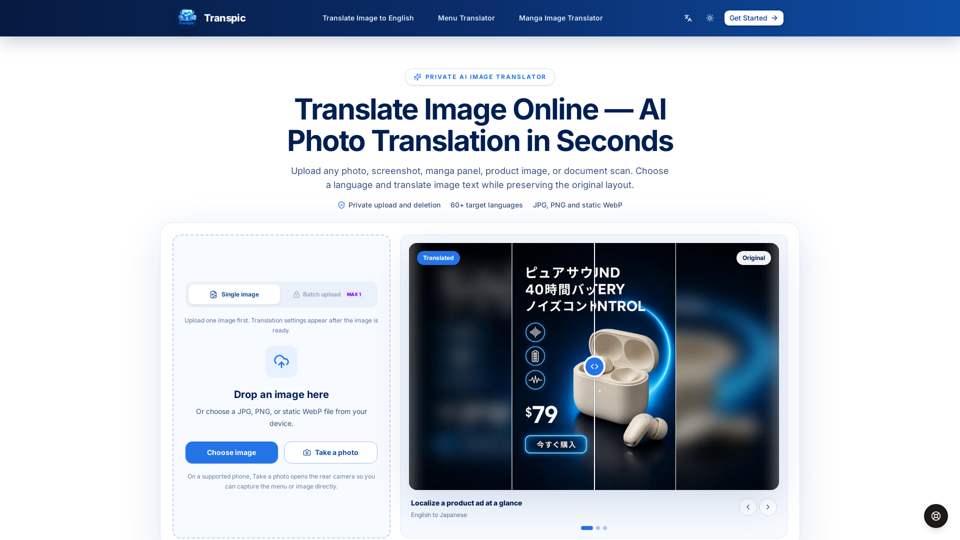
    Transpic AI is a professional-grade online image translator designed to convert text within photos, screenshots, manga panels, and product graphics while preserving the original visual layout. By utilizing advanced AI, the platform ensures that translated text remains accurately positioned near its corresponding visual elements, such as speech bubbles, labels, or product callouts. This makes it an essential tool for e-commerce sellers, manga readers, and professionals who need to localize visual content without losing context. Supporting over 60 languages, Transpic AI offers a private, secure workflow where users can review, edit, and adjust text blocks before exporting their final images. Whether you are translating menus, document scans, or promotional materials, Transpic AI provides a seamless, high-quality solution for maintaining the integrity of your original graphics while breaking down language barriers.

    Transpic AI -Features

    Overview

    Transpic AI is a specialized, private AI image translator designed to convert text within images into over 60 languages while preserving the original visual layout. It maintains the relationship between text and visual elements, making it an essential AI visual design and professional photo editing utility.

    Main Purpose and Target User Group

    Main Purpose

    To provide high-quality, layout-aware image translation that keeps text anchored to its original context, such as speech bubbles, product labels, or menu items.

    Target User Group

    E-commerce sellers localizing product graphics, manga translators, content creators, students, and professionals needing to translate documents, screenshots, or posters without losing visual integrity.

    Function Details and Operations

    Layout-Aware Translation

    Automatically detects text regions and positions translated phrases to match the original design.

    Editable Interface

    Users can review, resize, recolor, and reposition text blocks before exporting the final file.

    Specialized Modes

    Offers tailored workflows for different content types, including General (posters/menus), E-commerce (product graphics), Manga (dialogue/bubbles), and Document (tables/reports).

    Batch Processing

    Supports uploading multiple images simultaneously to streamline high-volume translation tasks.

    Privacy-First Processing

    Uploads are processed privately with short-lived access URLs; images are not published as public assets.

    User Benefits

    Context Preservation

    Ensures that translated text remains logically connected to icons, prices, or speakers, eliminating the need for manual redesigns.

    Time Efficiency

    Automates the tedious process of text extraction and re-insertion, allowing for rapid localization of visual assets.

    Professional Quality

    Provides high-fidelity results that are ready for commercial use, with options to remove watermarks on paid plans.

    Versatility

    Supports a wide range of formats including JPG, PNG, and static WebP, catering to diverse professional needs.

    Compatibility and Integration

    Supported Formats

    JPG, PNG, and static WebP.

    Language Support

    Over 60 target languages, including major Asian, European, Middle Eastern, and African languages.

    Device Accessibility

    Browser-based platform accessible via desktop and mobile; supports direct camera capture on supported mobile devices for instant menu or sign translation.

    Access and Activation Method

    Getting Started

    Users can begin for free by visiting transpic.ai and uploading an image directly to the browser-based uploader.

    Subscription Tiers

    Offers a free tier with daily credits, alongside tiered subscription plans (Starter, Pro, and Studio) that unlock higher limits, batch processing, commercial rights, and advanced editing features.

    Support

    Dedicated support is available via email at [email protected] for any technical assistance or account inquiries.
    Transpic AI -Frequently Asked Questions

    What is Transpic AI and how does it work?

    Transpic AI is a professional AI image generator and translation tool designed to translate text within images while preserving the original visual layout. By using advanced AI visual design technology, it detects text regions in photos, screenshots, manga, or product graphics and replaces them with translated text, ensuring that labels, speech bubbles, and product callouts remain in their correct context.

    Can I edit the text after the AI translates the image?

    Yes. Unlike standard translation tools, Transpic AI provides an interactive editor. After the AI processes your image, you can review the translated text blocks, adjust the wording, resize text, change colors, or move elements to ensure the final output meets your professional standards before exporting.

    Is my data private when using this AI image enhancement tool?

    Privacy is a core feature of Transpic AI. Uploaded images are processed for your specific job and stored privately using short-lived access URLs. Your source images are not published as permanent public assets, and you have control over your translation history based on your chosen plan.

    What file formats and languages does Transpic AI support?

    Transpic AI supports JPG, PNG, and static WebP formats. It currently supports over 60 languages, including major Asian, European, Middle Eastern, and African languages. Please note that direct PDF and Word document uploads are not supported; these files should be converted to supported image formats first.

    How is Transpic AI different from general translation services?

    While standard tools like Google or Yandex Translate provide text-only translations, Transpic AI is a specialized image translation tool. It maintains the "visual relationship" of your content—keeping prices next to menu items, dialogue inside speech bubbles, and feature icons near their descriptions—making it ideal for professional localization and design workflows.

    Transpic AI -Data Analysis

    Latest Traffic Information

    • Monthly Visits

      -

    • Bounce Rate

      0.00%

    • Pages Per Visit

      0.00

    • Visit Duration

      00:00:00

    • Global Rank

      -

    • Country Rank

      -

    Visits Over Time

    Traffic Sources

    • direct:
      0.00%
    • referrals:
      0.00%
    • social:
      0.00%
    • mail:
      0.00%
    • search:
      0.00%
    • paidReferrals:
      0.00%
    More data

    Transpic AI - Alternative

    Ghibli Meme Generator

    Ghibli Meme Generator - Make Studio Ghibli Memes Instantly with Our Free Online Tool

    --
    Ghibli AI Image Generator

    Ghibli AI Image Generator - Create Stunning Studio Ghibli AI Art & Anime from Text

    --
    Action Figure Generator

    Action Figure Generator - Create Custom 3D Action Figures & Personalized Toys From Photos

    --
    Pet to Human Generator

    Pet to Human Generator - Free AI Pet Transformation Online

    --
    More Tags about: Transpic AI