• Free Tools
  • Photo to Video

    Photo to Video - AI Video Generator: Convert Photos to Video & Image to Animation Slideshow Maker

    Photo to Video

    Photo to Video -Introduction

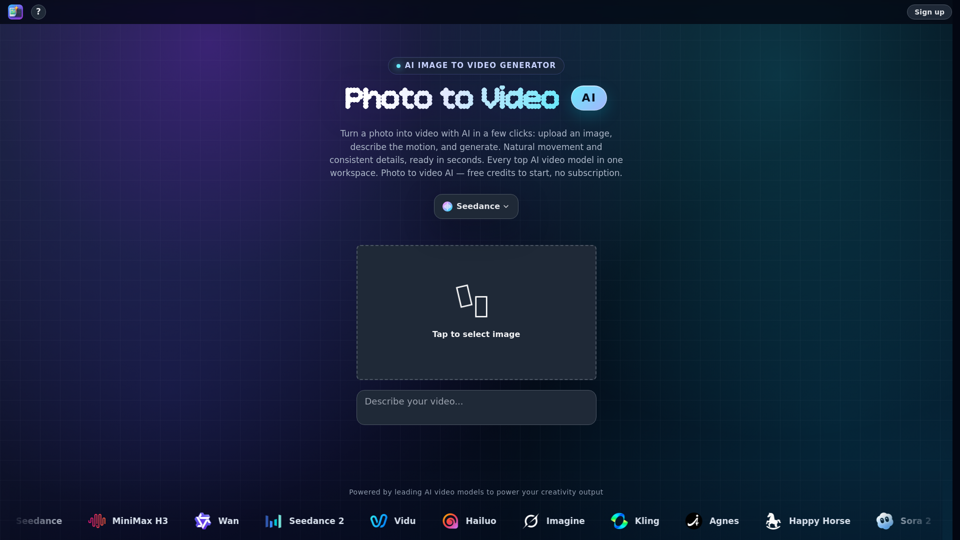
    Photo to Video is a cutting-edge AI generator that transforms static images into dynamic, cinematic video clips with ease. By leveraging a comprehensive workspace of the industry’s leading AI video models—including Seedance, MiniMax, Kling, and Wan—the platform allows users to animate portraits, product shots, and landscapes with natural movement and professional-grade precision. Whether you are looking to add subtle camera motion, bring old photos to life, or create complex visual sequences, this tool provides a seamless, subscription-free workflow. Designed for both beginners and creative professionals, Photo to Video ensures that every detail remains faithful to the original image while delivering high-quality, 4K-ready results in seconds. Experience the power of advanced generative AI to turn your still photography into captivating motion content without the need for complex editing software.

    Photo to Video -Features

    Overview

    Photo to Video is a comprehensive AI-powered platform designed to transform static images into dynamic, cinematic video content. By integrating the world’s leading AI video models into a single, intuitive workspace, it allows users to convert photos, illustrations, and product shots into high-quality animations without the need for complex editing software.

    Main Purpose and Target User Group

    The primary purpose of Photo to Video is to bridge the gap between still photography and motion media. It serves as an all-in-one AI video generator for content creators, social media marketers, e-commerce business owners, and digital artists who need to bring portraits, products, or artistic concepts to life quickly and professionally.

    Function Details and Operations

    • AI Image to Video Generation: Upload a single image and use text prompts to define motion, camera movement, and lighting.
    • Advanced Model Selection: Access a library of top-tier models including Seedance 2.5, MiniMax H3, Wan 3.0, Kling, Vidu, and more.
    • Motion Direction: Control camera behavior such as pans, zooms, orbits, and close-ups to achieve specific cinematic effects.
    • Specialized Animation Tools: Includes dedicated features for AI 360-degree product spins, portrait animation (blinking/smiling), and background swapping.
    • Multi-Shot Consistency: Use up to eight reference images to maintain shape, color, and composition across a sequence of shots.
    • High-Resolution Output: Supports exports up to 4K resolution in MP4 format.

    User Benefits

    • Efficiency: Generate professional-grade motion from a single still in seconds or minutes.
    • Cost-Effective: No subscription fees; users pay per video using a flexible credit system, with free credits provided to new accounts.
    • Creative Control: Direct the AI with specific prompts and reference images to ensure the final output matches your original vision.
    • Versatility: Suitable for a wide range of applications, from animating old family portraits to creating high-end product showcases for e-commerce.

    Compatibility and Integration

    Photo to Video operates as a web-based platform, ensuring compatibility across all modern web browsers. It functions as a standalone workflow, meaning users do not need external timeline editing software to produce finished, shareable video clips.

    Access and Activation Method

    Users can access the tool by visiting the official website at https://photo2video.ai. To begin, simply sign up for an account to receive free starting credits. Once logged in, users can immediately upload an image, select their preferred AI model, and start generating videos without the commitment of a monthly subscription.
    Photo to Video -Frequently Asked Questions

    What is Photo to Video and how does it work?

    Photo to Video is an advanced AI video generator that transforms still images into dynamic, cinematic video clips. By uploading a photo and providing a prompt, the platform uses leading AI models to analyze depth, lighting, and composition, adding natural motion and camera movements while preserving the original details of your image.

    Can I use Photo to Video to convert photos to video for free?

    Yes. Photo to Video offers free credits to new users, allowing you to start converting your images into animations without the need for a monthly subscription. You can experiment with various AI models and features using these initial credits.

    Which AI models are available on the platform?

    We provide access to a comprehensive suite of top-tier AI video models in one workspace, including Seedance 2.5, MiniMax H3, Wan 3.0, Kling, Vidu, Hailuo, LTX 2.5, and more. This allows you to compare results and choose the best model for your specific creative needs, from product rotations to portrait animation.

    Can I use this tool for professional tasks like product showcases or portrait animation?

    Absolutely. Whether you want to create an AI 360-degree spin for product listings, animate old family portraits to make faces blink and smile, or add motion to illustrations, our platform provides the precision tools needed to maintain high-quality, faithful results.

    What is the maximum resolution for the generated videos?

    Photo to Video supports high-quality output, allowing you to generate and export videos in up to 4K resolution, depending on the specific AI model selected for your project.

    Photo to Video -Data Analysis

    Latest Traffic Information

    • Monthly Visits

      -

    • Bounce Rate

      0.00%

    • Pages Per Visit

      0.00

    • Visit Duration

      00:00:00

    • Global Rank

      -

    • Country Rank

      -

    Visits Over Time

    Traffic Sources

    • direct:
      0.00%
    • referrals:
      0.00%
    • social:
      0.00%
    • mail:
      0.00%
    • search:
      0.00%
    • paidReferrals:
      0.00%
    More data

    Photo to Video - Alternative

    AI Toolbox Video Splitter

    AI Toolbox Video Splitter - Automated AI Video Cutter & Online Video Segmentation Tool

    --
    Seedance 2.0 Mini AI

    Seedance 2.0 Mini AI - Fast AI Video Generation & Text-to-Video Model by Videoweb

    --
    Vidregen AI

    Vidregen AI - Best AI Video Generator for Automated Content Creation and Text to Video Marketing

    --
    Seedance 2.5 AI

    Seedance 2.5 AI - Advanced AI Video Generation and Automated Synthesis Tool

    --
    More Tags about: Photo to Video