AI Cloth Swap

AI Cloth Swap - Free AI Clothing Changer & Virtual Try-On Tool for Fashion Models

AI Cloth Swap

AI Cloth Swap -Introduction

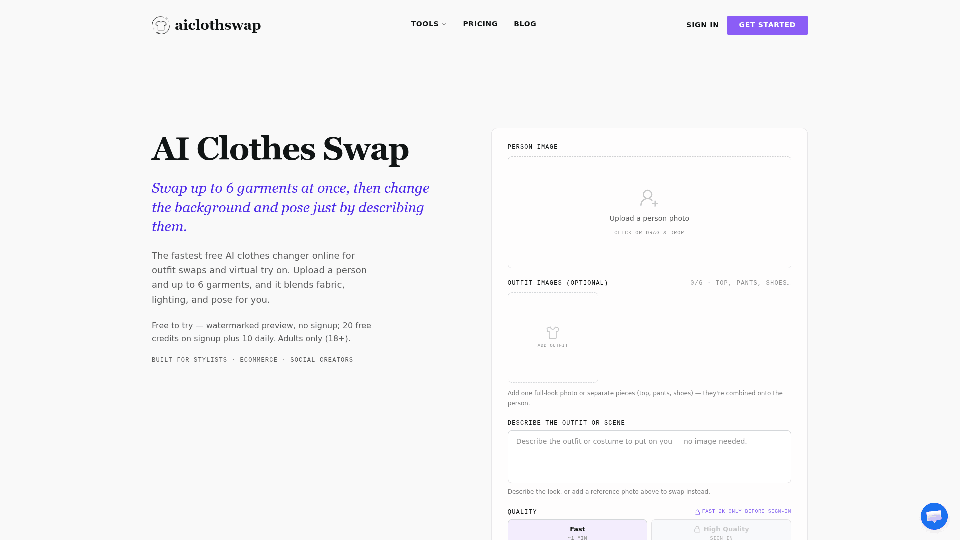
AI Cloth Swap is a cutting-edge virtual try-on platform that allows users to effortlessly restyle their photos with professional-grade precision. By leveraging advanced AI, the tool enables you to swap up to six garments at once, change backgrounds, and even adjust model poses simply by describing your vision. Whether you are an ecommerce seller looking to showcase a full catalog on a single model, a social media creator experimenting with new styles, or a stylist planning a shoot, this platform delivers realistic results that maintain natural skin textures, lighting, and body proportions. You can upload your own garment photos or use the AI to generate outfits based on specific occasions, such as weddings, business meetings, or casual outings. Designed for speed and ease of use, AI Cloth Swap eliminates the need for complex photo editing software, providing a seamless, high-quality solution for anyone looking to visualize new looks instantly.

AI Cloth Swap -Features

AI Cloth Swap

Overview
AI Cloth Swap is a cutting-edge, AI-powered virtual try-on tool designed to revolutionize digital fashion. It allows users to seamlessly replace clothing in photos while maintaining the original person’s identity, skin texture, lighting, and body proportions. By leveraging advanced generative AI, the platform transforms static images into professional-grade editorial shots without the need for manual photo editing or expensive studio sessions.

Main Purpose and Target User Group
The primary purpose of AI Cloth Swap is to provide a fast, realistic, and accessible solution for outfit visualization and virtual styling. It is specifically built for:

  • Ecommerce Sellers: To showcase entire product catalogs on a single model.
  • Social Media Creators: To experiment with new styles and trends before photoshoots.
  • Fashion Stylists: To mock up looks and colorways for clients efficiently.
  • Individual Shoppers: To visualize how specific garments or outfits look on their own body.

Function Details and Operations

  • Multi-Garment Swapping: Swap up to 6 garments simultaneously, including tops, bottoms, shoes, and accessories, for a complete head-to-toe transformation.
  • Text-to-Outfit Generation: If no garment photo is available, users can simply describe an outfit or occasion (e.g., "black-tie gala gown") to have the AI generate a look from scratch.
  • Background and Pose Control: Beyond clothing, users can describe changes to the environment or model pose (e.g., "hands in pockets," "minimalist beige wall") to fully customize the scene.
  • Smart Body Detection: The AI automatically identifies body contours and garment regions to ensure natural draping, realistic folds, and accurate fabric alignment.
  • Color Customization: Easily change the color of existing dresses or garments to compare different versions side-by-side.

User Benefits

  • Time and Cost Efficiency: Eliminates the need for physical samples, professional photographers, and hours of manual Photoshop masking.
  • High-Fidelity Realism: Preserves the subject's original face, skin texture, and lighting, ensuring the final output looks like a genuine photograph rather than a digital overlay.
  • Versatility: Supports a wide range of styles, from swimwear and activewear to formal business attire and wedding gowns.
  • User-Friendly Workflow: A simple "upload, describe, and generate" process that delivers results in seconds.

Compatibility and Integration

  • Web-Based Platform: Accessible via any modern web browser on both desktop and mobile devices.
  • Format Flexibility: Accepts various input types, including flat-lay product photos, ghost-mannequin shots, and full-look images.
  • Commercial Readiness: Offers subscription tiers that include commercial use licenses, making it suitable for professional business workflows.

Access and Activation Method

  • Free Access: Users can start for free with a daily credit allowance and watermarked previews.
  • Account Activation: Sign up to unlock high-quality (up to 4K) downloads, remove watermarks, and access priority processing.
  • Flexible Pricing: Options include monthly subscriptions, annual plans for power users, and "pay-as-you-go" credit packs that never expire, ensuring a plan for every scale of operation.
AI Cloth Swap -Frequently Asked Questions

How does the AI Cloth Swap tool work?

AI Cloth Swap uses advanced AI to replace the clothing in your photos while preserving the original person, pose, lighting, and background. Simply upload a photo of a person and up to 6 garment images (or describe the outfit you want), and the AI will blend the new clothing onto the subject with realistic fabric textures, folds, and shadows.

Is the AI clothing changer free to use?

Yes, Aiclothswap offers a free-to-try version that allows you to generate watermarked previews. Upon signing up, you receive 20 free credits, plus 10 additional credits every day you sign in, allowing you to experience the virtual try-on tool at no cost.

Is my data safe when I upload photos?

Aiclothswap prioritizes user privacy. We do not use your uploaded photos for public training purposes. You retain full control over your images, and our platform is built to ensure a secure environment for your fashion editing and virtual try-on needs.

Can I use the AI fashion model tool on my phone?

Yes, Aiclothswap is fully optimized for mobile browsers. You can upload photos directly from your phone’s gallery, perform outfit swaps, and download your results on the go, making it a convenient virtual try-on tool for social media creators and stylists.

How realistic are the results from Aiclothswap?

Our AI is designed to maintain consistent skin texture, lighting, and body proportions. By using high-quality source photos and clear garment images, the tool produces professional, editorial-grade results that look like real photographs rather than digital overlays.

What kind of photos work best for the AI clothing changer?

For the best results, use a clear, well-lit portrait where the person is facing the camera and their current outfit is visible from shoulders to hips. Avoid photos with heavy shadows, motion blur, or busy backgrounds. For garments, flat-lay or ghost-mannequin shots on a plain background work best for the AI to detect seams and fabric weight.

How long does an AI outfit swap take?

The process is incredibly fast. Once you upload your images and click generate, the AI typically completes the outfit swap in under a minute, allowing you to iterate on your looks quickly.

Can I share or sell the results generated by Aiclothswap?

Yes. Users on our paid plans receive a commercial use license, allowing you to use the generated images for your ecommerce store, social media, or professional portfolios. Please refer to our Terms of Service for specific details regarding commercial usage.

AI Cloth Swap -Data Analysis

Latest Traffic Information

  • Monthly Visits

    -

  • Bounce Rate

    0.00%

  • Pages Per Visit

    0.00

  • Visit Duration

    00:00:00

  • Global Rank

    -

  • Country Rank

    -

Visits Over Time

Traffic Sources

  • direct:
    0.00%
  • referrals:
    0.00%
  • social:
    0.00%
  • mail:
    0.00%
  • search:
    0.00%
  • paidReferrals:
    0.00%
More data

AI Cloth Swap - Alternative

AI Tattoo Generator

AI Tattoo Generator - Free AI Tattoo Design & Custom Tattoo Ideas

--
Hey Dream AI

Hey Dream AI - Free AI Art Generator & Image Creator for Dream Art & AI Photos

--
Celebrity Look Alike

Celebrity Look Alike - AI Face Match & Celeb Doppelganger Finder

--
AI Halloween Generator

AI Halloween Generator - Free AI Halloween Image Generator for Halloween Fun by Flux-ai

--
More Tags about: AI Cloth Swap