IMAGE TO VIDEO - KOOX AI

IMAGE TO VIDEO - KOOX AI - Free AI Video Generator: Photo to Video Instantly with Koox AI

IMAGE TO VIDEO - KOOX AI

IMAGE TO VIDEO - KOOX AI -Introduction

Unleash your creativity with IMAGE TO VIDEO - KOOX AI, the groundbreaking platform that transforms your static images into dynamic videos. Say goodbye to lifeless photos and hello to engaging visual stories. KOOX AI empowers you to bring your pictures to life with realistic motion and captivating effects, all with just a few clicks. Whether you're a content creator, marketer, or simply looking to add a touch of magic to your personal memories, IMAGE TO VIDEO - KOOX AI offers an intuitive and powerful solution to elevate your visual content.

IMAGE TO VIDEO - KOOX AI -Features

IMAGE TO VIDEO - KOOX AI

Overview
IMAGE TO VIDEO - KOOX AI is an AI-powered platform that transforms static images into dynamic, realistic videos. It uses advanced AI models to generate motion, audio, and depth, bringing photos to life with physics-accurate animation. The platform aims to simplify video creation, making it accessible to users without extensive editing skills.

Main Purpose and Target User Group

  • Main Purpose
    To convert any static image (photo, drawing, 3D render) into a high-quality, animated video with realistic motion and synchronized audio, based on a text prompt.

  • Target User Group

    • Influencers & Content Creators: Create engaging, scroll-stopping video content from static images, boosting engagement.
    • Product Marketers: Animate product shots for more compelling marketing materials and increased conversions.
    • Artists & Animators: Prototype animation ideas quickly and efficiently, testing concepts before full production.
    • Individuals & Businesses: Easily create dynamic video content from images without professional video editing software or skills.

Function Details and Operations

  • Image to Video Generation

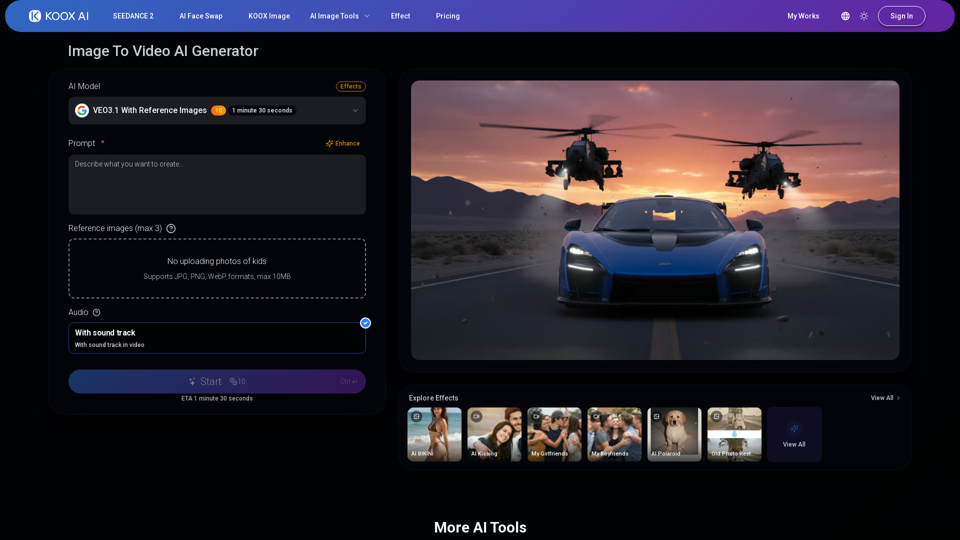
    • Input: Users upload an image (JPG, PNG, WebP, max 10MB) and provide a text prompt describing the desired motion.
    • AI Models: Utilizes next-gen AI models like VEO3.1 (with reference images support), SORA2, Veo 3, Runway, and others, ensuring state-of-the-art video generation.
    • Physics-Based Motion: Generates realistic movement that accounts for gravity, momentum, and inertia, making animations appear natural.
    • Consistency: Ensures subjects remain consistent frame-by-frame, preventing flickering or morphing issues common in other tools.
    • Reference Images: Supports up to 3 reference images for more precise video generation (available with VEO3.1).
  • Synchronized Audio Generation

    • Automatic Audio: Generates audio that matches the visual motion (e.g., footsteps, wind sounds).
    • Prompt-Driven Audio: Users can describe desired sounds in their text prompt, and the AI will generate corresponding sound effects and ambient audio.
  • User Interface: Simple Three-Step Process

    1. Drop an image.
    2. Type the desired motion in a prompt.
    3. Hit generate and download the video.
  • Output
    High-quality video output, ready for download.

User Benefits

  • Increased Engagement: Transforms static images into dynamic videos, capturing audience attention and boosting engagement rates.
  • Time and Cost Savings: Significantly reduces the time and effort required for video creation, eliminating the need for complex editing software or professional skills. What used to take days can now be done in minutes.
  • Enhanced Creativity: Empowers users to bring their creative visions to life by animating any image with realistic motion and sound.
  • High-Quality Output: Delivers videos with realistic motion, consistent subjects, and synchronized audio, ensuring professional-looking results.
  • Accessibility: Easy-to-use interface makes video creation accessible to everyone, regardless of their technical expertise.
  • Rapid Prototyping: Allows artists and animators to quickly test and iterate on animation ideas.

Compatibility and Integration

  • Input Formats: Supports JPG, PNG, WebP image formats.
  • AI Model Integration: Integrates multiple leading AI image-to-video models (VEO3.1, SORA2, Runway, etc.) into a single platform, offering users a comprehensive suite of options.
  • Web-Based Platform: Accessible directly through a web browser, requiring no software installation.

Customer Feedback and Case Studies

  • Testimonials / Use Cases Highlighted

    • Influencers: 2x engagement rate by converting static photos to videos.
    • Content Creators: Ship content 80% faster, reducing creation time from a day to 5 minutes.
    • Product Marketers: 70% boost in conversions by animating product shots.
    • Artists & Animators: Prototype animations in minutes, testing ideas with various styles (anime, 3D renders).
  • Key Differentiators (as per platform)

    • Generates synchronized audio, not just visuals.
    • Zero flickering or morphing, maintaining subject consistency.
    • Physics-based motion for realistic animation.
    • Access to multiple state-of-the-art AI models in one place.

Access and Activation Method

  • Free Credits: Users can sign up and receive free credits to test the platform without requiring a credit card upfront.
  • Subscription / Credit Purchase: Additional credits can be purchased for continued use after exhausting free credits.
  • Sign-In: Users need to sign in to access the generator and manage their works.
IMAGE TO VIDEO - KOOX AI -Frequently Asked Questions

What is IMAGE TO VIDEO - KOOX AI?

IMAGE TO VIDEO - KOOX AI is an AI model that transforms static images into dynamic videos with realistic motion. You upload a photo, provide a text prompt describing the desired action, and the AI generates a video where elements move according to physics, giving your photos a temporal dimension.

How can IMAGE TO VIDEO - KOOX AI help improve my content?

IMAGE TO VIDEO - KOOX AI allows you to convert any photo into engaging video content, helping to double your engagement rate by capturing viewers' attention with motion. It also speeds up content creation by 80%, turning a day's work into minutes, and can boost conversions by 70% by animating product shots. Artists and animators can also prototype animations in minutes.

What makes IMAGE TO VIDEO - KOOX AI different from other image to video generators?

IMAGE TO VIDEO - KOOX AI stands out due to several key features:

Physics-Based Motion

It understands gravity, momentum, and inertia, making movements realistic.

Zero Flickering or Morphing

It maintains consistency frame-by-frame, preventing subjects from morphing into strange shapes.

Audio That Actually Matches

It generates procedurally synced audio that matches the visual motion, such as footsteps or wind sounds.

Multiple AI Models

It provides access to state-of-the-art models like VEO3.1, SORA2, and Runway, all in one place.

Is IMAGE TO VIDEO - KOOX AI free to use?

Yes, IMAGE TO VIDEO - KOOX AI offers free credits for you to test out the service without needing a credit card. You can sign up and start converting images to videos immediately. Additional credits can be purchased if you wish to continue using the service.

How does the audio generation work in IMAGE TO VIDEO - KOOX AI?

Audio generation is enabled by default. When you provide your text prompt for the video, you can also describe the sounds you want. The AI analyzes the visual motion and generates matching sound effects and ambient audio, ensuring it's procedurally synced with the video.

How many AI models does IMAGE TO VIDEO - KOOX AI support?

IMAGE TO VIDEO - KOOX AI integrates all major image to video models, including VEO3.1, SORA2, and Runway. The platform is continuously updated to include new breakthrough models as they emerge, ensuring it remains cutting-edge.

What kind of images can I use with IMAGE TO VIDEO - KOOX AI?

You can use any style of image, including photos, drawings, and 3D renders. The AI is designed to work with a wide variety of visual inputs.

How do I use IMAGE TO VIDEO - KOOX AI?

It's a simple three-step process:

Drop your image

Upload any photo, drawing, or 3D render.

Type what motion you want

Describe the desired action in a text prompt. You can be specific or let the AI improvise.

Hit generate

The AI will create your video, which you can then download in seconds.

IMAGE TO VIDEO - KOOX AI Support Email

Here is the KOOX AI support email for customer service: [email protected].

KOOX AI Login

KOOX AI Login Link: https://koox.ai/sign-in

KOOX AI Sign up

KOOX AI Sign up Link: https://koox.ai/sign-in (The sign-in page also typically includes an option to sign up or create an account.)

IMAGE TO VIDEO - KOOX AI -Data Analysis

Latest Traffic Information

  • Monthly Visits

    -

  • Bounce Rate

    0.00%

  • Pages Per Visit

    0.00

  • Visit Duration

    00:00:00

  • Global Rank

    -

  • Country Rank

    -

Visits Over Time

Traffic Sources

  • direct:
    0.00%
  • referrals:
    0.00%
  • social:
    0.00%
  • mail:
    0.00%
  • search:
    0.00%
  • paidReferrals:
    0.00%
More data

IMAGE TO VIDEO - KOOX AI - Alternative

Hey Dream AI

Hey Dream AI - Free AI Art Generator & Image Creator for Dream Art & AI Photos

--
Celebrity Look Alike

Celebrity Look Alike - AI Face Match & Celeb Doppelganger Finder

--
VEO 3.1 Video Generator

VEO 3.1 Video Generator - AI Video Generation, Text-to-Video, Realistic AI-Powered Video

--
Sora Video Downloader

Sora Video Downloader - Free Sora AI Video Download & Content Downloader

--
More Tags about: IMAGE TO VIDEO - KOOX AI